
What is Felix Sales Agent?
Sales Agent is the skill that does Felix's one-to-one outreach. It handles conversations across calls, texts, and emails with a human-like presence, grounded in Living Database intelligence, property data, and the full history of your prior engagement with each contact.
Living Database, Ask Felix, and Nurture are included on every plan. Sales Agent is an optional add-on you turn on when you want Felix making calls, sending texts, and running one-to-one email.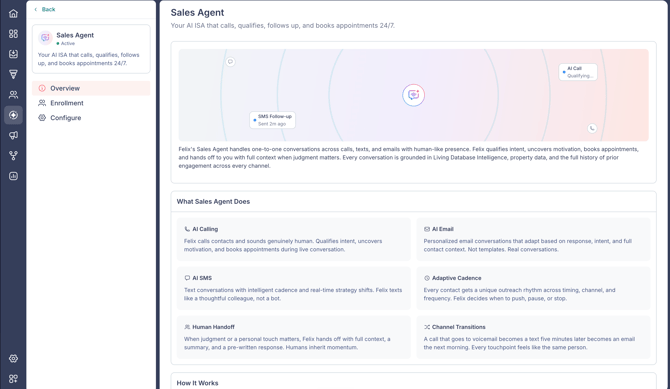
You decide who Felix reaches out to. Felix works your Active contacts up to your plan's capacity, filling it automatically with the highest-intent contacts from your database. New high-intent contacts queue automatically as they come in.
In this guide:
- What Sales Agent does
- How Sales Agent works
- Add Sales Agent to your plan
- Who Felix works and who Felix skips
- Let Felix decide who to work
- Pending contacts
- Compliance guardrail
- Enroll contacts in Sales Agent
- Disable Sales Agent for a contact
- Pause and resume Sales Agent
- Configure Sales Agent
- FAQs
What Sales Agent does
- AI calling: Felix places calls and holds natural conversations.
- AI email: Felix sends conversational, one-to-one emails.
- AI SMS: Felix texts and responds in real time.
- Adaptive cadence: Felix paces follow-up to each contact, with attempt limits and cooling-off periods so no one is over-contacted.
- Human handoff: when a contact is ready to talk to a person, Felix hands the conversation to your team.
- Channel transitions: Felix moves between call, text, and email as the conversation calls for it.
How Sales Agent works
- Felix carries one continuous conversation across calls, texts, and emails, so context isn't lost when the channel changes.
- Felix is grounded in Living Database intelligence, property data, and the full history of prior engagement.
- Built-in attempt limits and cooling-off periods prevent over-contacting.
- Outcomes feed back, so Felix improves over time.
- Felix reaches out only when it makes sense. Choosing not to contact is always a valid decision.
Add Sales Agent to your plan
Sales Agent is an optional add-on. You can add it during Felix setup, from the Sales Agent card on Home, or anytime from billing.
To add it from billing:
- Go to Settings > Billing.
- On the Felix Sales Agent row, select Upgrade.
- On the Details step, choose your Sales Agent capacity.
- Select Review Changes to see the billing summary.
- Select Confirm & Pay.
If you want to talk it through first, select Talk to us in the panel.
🗒️ Note: Once Sales Agent is active, enroll contacts and set your calling and texting configuration from the Sales Agent skill. To call and text, complete business registration.
Who Felix works and who Felix skips
You decide who Felix reaches out to. Felix works the Active contacts you enroll, and new high-intent contacts queue automatically as they come in.
- Who Felix works: Felix fills your capacity with the highest-intent contacts automatically. See Let Felix decide who to work below.
- Compliance guardrail: set how Felix treats Do Not Call (DNC) data, and record where you already hold consent. See Compliance guardrail below.
- Who Felix skips: contacts inside any of these sources are excluded from Sales Agent outreach. Your account may already have exclusions in place, so review what is listed before adding your own. Remove one with the trash icon, or select Add Exclusion Source to add more.
🗒️ Note: Exclusions always win. If a contact is in one of your exclusion sources, Felix does not contact them, even if you enroll them yourself or a workflow enrolls them.
🗒️ Note: Felix will not reach out to a contact whose property is actively listed.
🗒️ Note: Exclusions apply to the whole contact, not to a single property. If a contact owns a property in an excluded area and another in your service area, the entire contact is excluded from outreach.
Felix works Active contacts. Monitored contacts are also evaluated, and Felix activates one when its signals are strong enough. Learn more about Active vs Monitored contacts.
Let Felix decide who to work
On the Sales Agent Enrollment tab, Who Felix Works shows how Felix selects contacts using Let Felix decide (recommended). Felix fills your available capacity with the highest-intent contacts from your database, with no list-building required from your end. Felix evaluates Monitored contacts alongside Active ones. When a Monitored contact's signals are strong enough, Felix marks them Active and starts working them, so a warm contact does not sit unworked because of its record status.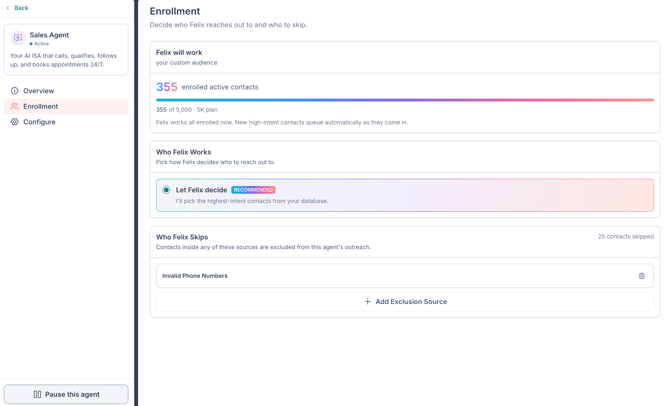
Felix prioritizes by intent, working High intent first, then Medium, then Early. Learn more about signals and intent.
Your available capacity is set by your plan. Felix works as many contacts as your plan allows. The Felix will work summary at the top of the Enrollment tab shows how many contacts Felix is working now and how many are queued beyond your current capacity. Queued contacts move into active outreach automatically as slots free up.
Contacts you enroll yourself always come first. Felix only fills the capacity left over after your own enrollments, and it never sets aside a contact that is in an active conversation to make room.
🗒️ Note: If you currently choose your own segments to scope Felix, switching to Let Felix decide is permanent. Once you switch, the option to choose your own segments is removed and can't be restored. Contacts already in an active conversation aren't interrupted.
How Felix frees up slots
When capacity is full, Felix makes room by stepping back from its own picks that are not yet in an active conversation, so a higher-priority contact can take the slot. A contact Felix steps back from moves to Pending.
A contact Felix is still trying to reach who has not responded after 5 or more attempts over 30 or more days is treated as a quiet contact. It drops to the lowest priority so a fresher contact can take its place. The contact is set aside, not removed, and can resume later when capacity is available. Contacts in an active conversation are never set aside.
🗒️ Note: Only Owners and Admins can change enrollment settings.
Pending contacts
Pending is the status for contacts Felix is holding rather than actively working. Felix parks a contact in Pending when there is a reason to stop reaching out for now, and brings them back into rotation automatically when it is time to reach out again. Nothing is required from you: Felix handles the timing.
Every Pending contact carries the reason Felix parked them:
- Follow-up later: the contact asked to reconnect down the line.
- No reply: Felix's outreach has not had a response.
- Not interested: the contact declined.
A contact in Pending does not hold one of Felix's active working slots. That capacity goes to the next contact instead, so Felix works more of your database at once without any change to your plan. Engaging counts only contacts in a real back-and-forth, and Pending shows you which contacts are not moving and why.
To see them, go to Conversations from the left sidebar and open Pending under Felix Outreach.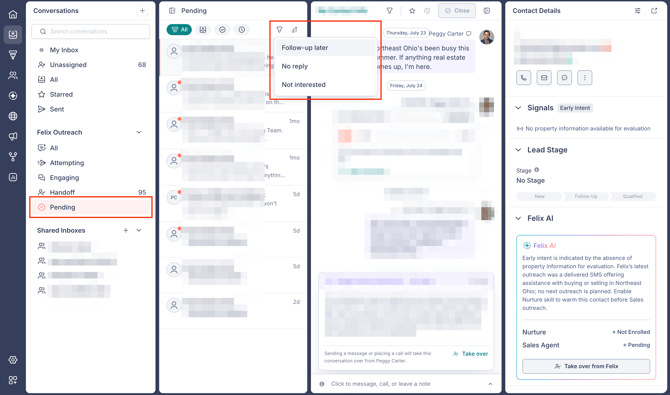
Learn more about the Felix Outreach inboxes.
Compliance guardrail
Between Who Felix Works and Who Felix Skips on the Enrollment tab, the compliance guardrail sets how Felix treats Do Not Call (DNC) data before reaching out. 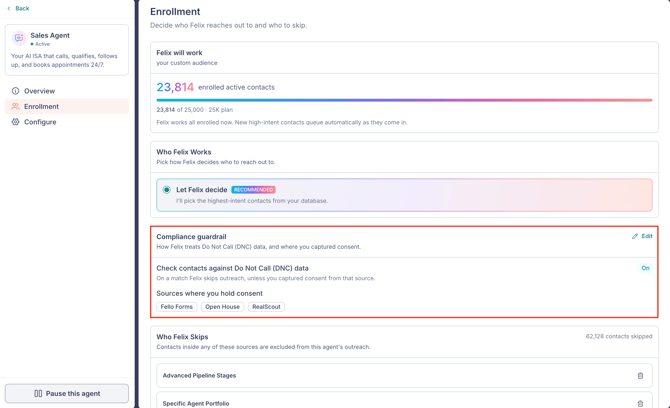
With the check on, Felix skips contacts registered on DNC, unless they match a consent source or tag you have recorded.
Click the Edit (pencil) icon on the card to change it. Learn more about the compliance guardrail.
Enroll contacts in Sales Agent
Enrollment is how you put contacts in front of Felix. You can enroll one contact, several at once, or contacts that flow through a workflow.
From a contact
- Open the contact and go to the Felix AI section.
- Under Sales Agent, select Enroll in Sales Agent.
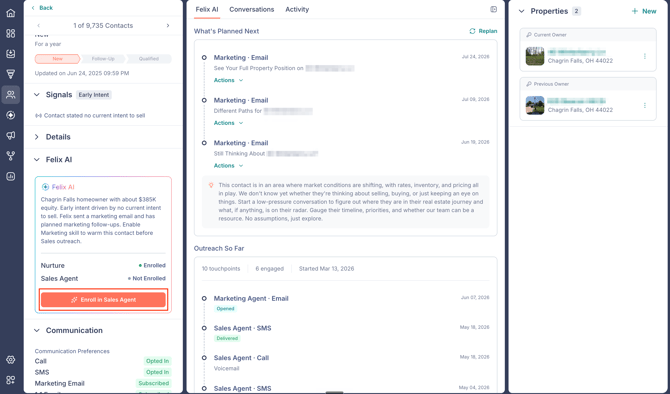
- Review who is being enrolled and the signals, edit Why are we reaching out? if needed, then select Enroll in Sales Agent.
In bulk
- Select the contacts in the Contacts module.
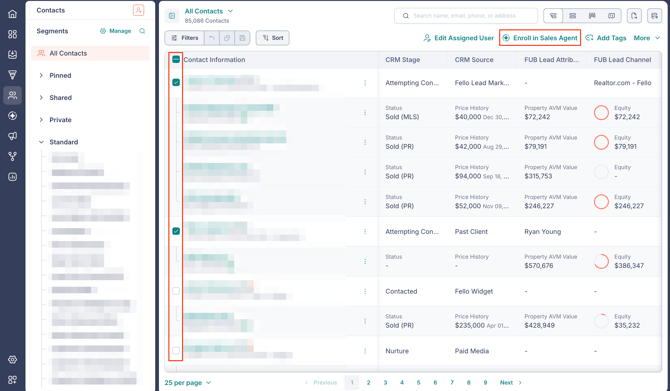
- Select Enroll in Felix, then Enroll in Sales Agent.
- Add a reason under Why are we reaching out?, then enroll.
From a workflow
You can enroll contacts as a step in a workflow.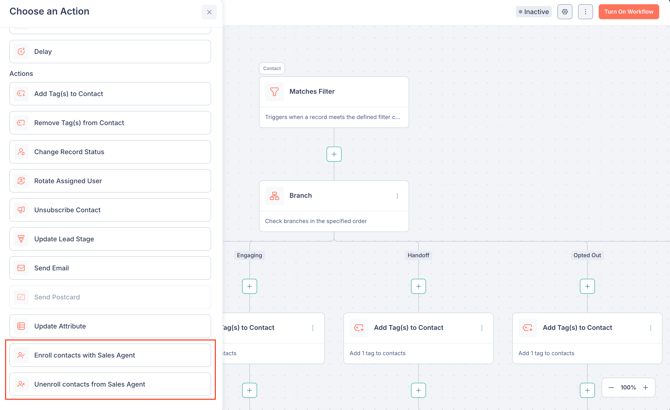
- In the workflow builder, add a step and choose Enroll contacts with Sales Agent.
- Under Felix's Plan, tell Felix how to approach the contacts enrolled through this workflow (up to 500 characters).
- Choose how Felix should treat the enrollment:
- Follow-up: Felix paces outreach to each contact's signals and intent. Best for existing contacts and re-engagement.
- New lead: Felix treats the contact as a fresh inbound lead and prioritizes them for first outreach at the earliest opportunity.
- Select Save.
To stop outreach from a workflow, add the Unenroll contacts from Sales Agent step. It needs no configuration.
🗒️ Note: Felix's Plan only updates contacts that don't already have a plan set.
🗒️ Note: Sales Agent needs a phone number to build a contact's plan. A contact can be enrolled without an email. (Nurture, by contrast, needs an email. Learn more about Felix Nurture.)
🗒️ Note: Once you enroll a contact, Felix starts working them. New high-intent contacts are prioritized. A contact's intent affects how Felix paces outreach, not whether Felix works the contact. Learn more about signals and intent.
🗒️ Note: Any workflow trigger can lead to the Enroll contacts with Sales Agent action. A contact in the Handoff stage can still be enrolled.
Disable Sales Agent for a contact
When you want to keep one person out of sales outreach while Felix keeps nurturing them (a past client, a referral partner, anyone who asked you to stop hearing from your team), disable Sales Agent for them. Felix Nurture and every other skill keep running.
Disable vs. unenroll
The contact's More menu has two ways to stop Sales Agent, and they are not the same: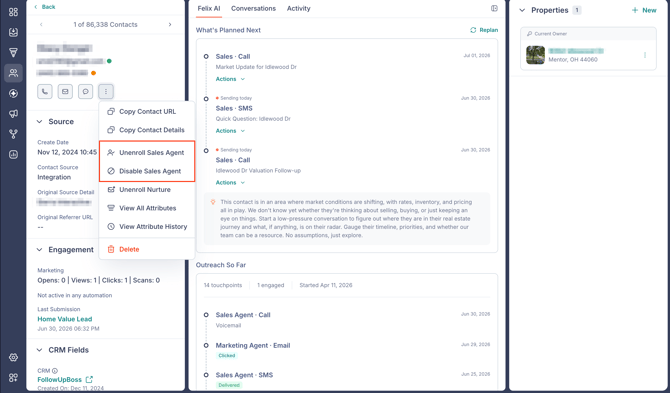
- Unenroll Sales Agent: Stops Felix's active outreach, but Felix still replies if they call or text in. They stay eligible, so you can enroll them again at any time.
- Disable Sales Agent: Stops outreach and stops Felix from responding to any inbound call or text from them. Any Sales Agent outreach already scheduled stops too, and they cannot be enrolled in Sales Agent again until you re-enable it.
Use disable to protect a relationship for the long term. Use unenroll to simply pause active outreach.
🗒️ Note: Disable works on anyone in your database, whether or not Felix has worked them before. Anyone who can open a contact can disable Sales Agent for them, with no extra permission needed.
How to disable Sales Agent
- Open the contact, then click the More (3-dot) icon next to the call, email, and message actions.
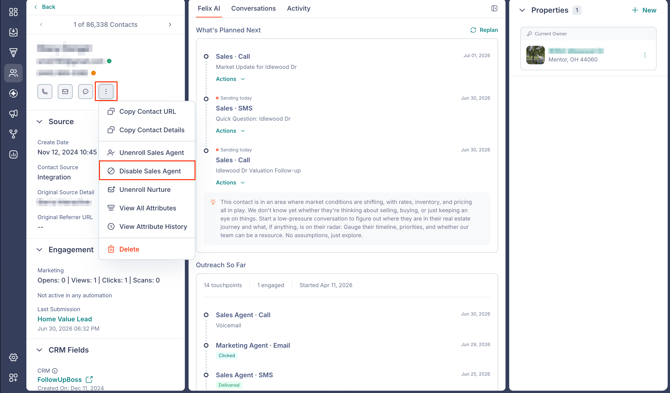
- Select Disable Sales Agent.
- Review the confirmation dialog, then click Disable.
Once disabled, their Felix AI panel shows Sales Agent · Disabled, and Enroll in Sales Agent is greyed out with a "Contact has been disabled" note until you re-enable.
Re-enable Sales Agent
- Open the contact and click the More (3-dot) icon.
- Select Re-enable Sales Agent, then click Re-enable to confirm.
🗒️ Note: Re-enabling lifts the block but does not restart outreach on its own. The person returns to a not-enrolled state, and Felix resumes only after you enroll them again.
Pause and resume Sales Agent
Pausing stops all Sales Agent outreach across your account at once, without changing who is enrolled. Enrolled contacts keep their context, and Felix picks up where it left off when you resume. Pause when you need to stop outreach for a while, for example when lead volume is high or you are reworking your enrollment criteria.
🗒️ Note: Pause acts on your whole account. To stop Sales Agent for one person instead, unenroll or disable for that particular contact.
Pause Sales Agent
- Go to Felix AI from the left sidebar and open Sales Agent under Your Skills.
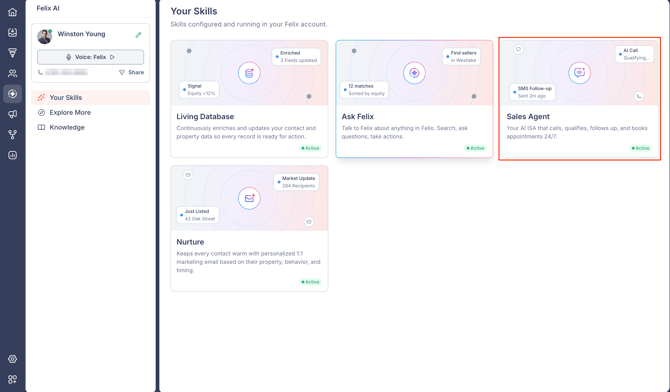
- Click Pause this agent at the bottom of the left panel.
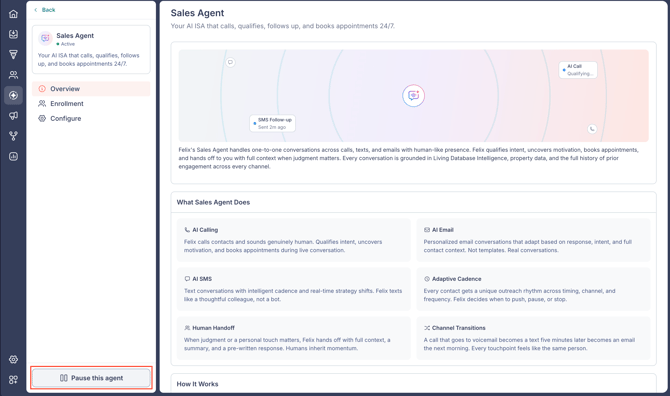
- In the Pause Sales Agent? dialog, click Pause.
The status under the Sales Agent name changes to Paused. Felix stops all Sales Agent outreach, and also stops answering inbound calls and replying to inbound texts, until you resume.
Resume Sales Agent
- Click Resume this agent at the bottom of the left panel.
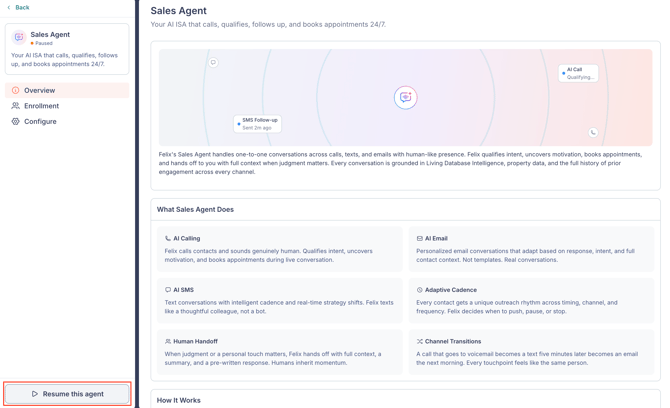
Felix resumes right away, with no confirmation step, and continues each contact from where it left off. The status returns to Active.
Configure Sales Agent
Felix works out of the box once contacts are enrolled. To set Felix's style, call greetings, actions like call transfer, and the days and hours Felix can call and text, see Configuring Felix Sales Agent.
Frequently asked questions
- Do I have to enroll contacts, or does Felix pick them automatically?
- With Let Felix decide (the default), Felix automatically fills your capacity with the highest-intent contacts from your database, so you don't have to build a list or enroll anyone yourself. Contacts you do enroll always come first.
- How soon does Felix make first outreach after a contact is enrolled?
- Usually within minutes, as long as the enrollment falls inside your calling and SMS window. Felix decides whether to open with a call, text, or email. Treat this as typical rather than guaranteed. How fast Felix gets to a specific contact also depends on how many contacts are enrolled at the same time.
-
What happens if a workflow enrolls a lot of contacts at once?
-
Felix works many contacts at once, but not an unlimited number. Contacts that arrive a few at a time get first outreach quickly. When a large group enrolls in one go, Felix works through them in waves, so the contacts at the back of that group wait longer than the ones at the front.
Setting the enrollment to New lead prioritizes those contacts for first outreach, but it does not change how many Felix can work at once. If speed to first outreach is the goal, build the workflow so contacts enroll as they arrive rather than in batches.
-
- Can Felix work a contact who has only a phone number and no email?
- Yes. Sales Agent needs a phone number to build a plan and can enroll a contact without an email. Nurture needs an email.
- Do workflows override exclusions?
- No. Exclusions apply no matter how a contact was enrolled, including manual enrollment and the Enroll contacts with Sales Agent workflow action. To let Felix work someone who is currently excluded, remove them from the exclusion source.
- Will Felix reach out to a contact whose home is currently listed?
- No. Felix will not engage a contact whose property is actively listed.
- When does Felix stop working a contact?
- Felix manages and closes its own Sales Agent conversations. When a contact is ready to talk to a person, Felix hands off and stops its own outreach. A handoff does not make the contact ineligible, so you can enroll them in Sales Agent again at any time, including through a workflow. If a teammate takes over and you want Felix to stay off the contact, unenroll or disable Sales Agent for them. Learn more about handoffs and warm transfers.
- Is Felix multilingual?
- Felix operates in English. Other languages, including Spanish, are not supported at this time.
- Can I run Felix for inbound calls only?
- Not today. Felix is an outbound sales agent that also answers inbound calls on its own number. A dedicated inbound agent is planned for the future.
- Can Felix call from my existing phone number?
- No. Felix calls and texts from its own numbers, provisioned by Fello. A number you already use elsewhere, such as one from your CRM or another phone system, cannot be added or transferred in. Learn more about phone numbers and Copilot seats.
- Can I tailor Felix for a specific area or lead type, such as investors or flips?
- Yes. Create a segment for that audience, enroll it in Sales Agent, and tell Felix why you are reaching out. Felix also draws on your business context to shape the conversation.
- Does Felix work buyer leads, or only sellers?
- Both. Felix is not limited to homeowners or seller conversations. Felix uses the contact's history and the reason you give for reaching out to shape the conversation, so a renter looking to buy is a conversation Felix can hold. To focus Felix on a buyer audience, build a segment for it, enroll it, and say why you are reaching out under Why are we reaching out?
- Can I limit Felix to one area, such as a single state?
- Yes, using an exclusion. Exclusions are a skip list, so to restrict outreach to one area you exclude everyone outside it. Select Add Exclusion Source, switch to Custom Filters, choose the State attribute, set the condition to is none of, and select the state you want to keep. Every contact outside that state is skipped, so Felix works only the contacts inside it.
- Does a contact need a property record for Felix to work them?
- No. A contact with no property record can be enrolled and worked. Property data enriches the conversation when it exists, but it is not a requirement for outreach. Enrollment decides whether Felix works a contact, not the strength of its signals, so a contact showing No Intent can still be worked.
- Can Felix send a text in the middle of a call?
- Not yet. This is planned for a future release.
- What happens when Felix reaches a call screener?
- Felix states its name and reason for calling, the same as it would with a person.
- Can Felix understand images or GIFs a contact sends?
- Not at this time.
- Does turning on Let Felix decide remove the contacts I enrolled myself?
- No. Your own enrolled contacts stay and take priority. Felix only fills the capacity that is left over.
-
Will Felix work my Monitored contacts?
-
Yes. Felix evaluates Monitored contacts as well as Active ones. When a Monitored contact shows strong enough signals, Felix activates them and begins outreach. Contacts in an exclusion source are never activated or worked, whatever their record status.
-
- What does "queued" mean?
- Queued is the count shown in the "Felix will work" summary on the Enrollment tab. These contacts are eligible for outreach but beyond what Felix can actively work under your plan right now. They move into active outreach automatically as slots free up.
- Will Felix call contacts who are registered on the Do Not Call list?
- Only if you allow it. With the compliance guardrail's DNC check on, Felix skips DNC-registered contacts unless they match a consent source or tag you recorded. Learn more about the compliance guardrail.
- Does Felix still answer inbound calls and texts while Sales Agent is paused?
- No. While Sales Agent is paused, Felix does not answer inbound calls or reply to inbound texts. Inbound handling returns when you resume. To stop outreach for one person while Felix keeps handling their inbound, unenroll that contact instead.
- No. While Sales Agent is paused, Felix does not answer inbound calls or reply to inbound texts. Inbound handling returns when you resume. To stop outreach for one person while Felix keeps handling their inbound, unenroll that contact instead.