
What the compliance guardrail does
The compliance guardrail sets how Felix treats Do Not Call (DNC) data before Sales Agent outreach, and lets you record where you already hold consent to contact someone.
It sits on the Sales Agent Enrollment tab, between Who Felix Works and Who Felix Skips.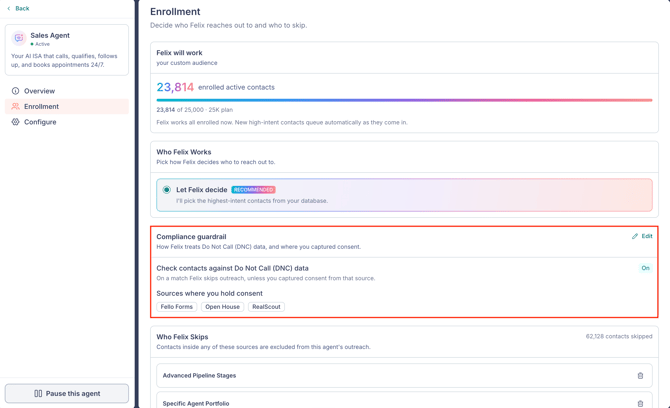
To open it, go to Felix AI from the left sidebar, open Sales Agent under Your Skills, select the Enrollment tab, then click the Edit (pencil) icon on the Compliance guardrail card.
Felix also screens contacts against third-party litigation data before calling or texting. That check runs on its own and is not configurable.
In this article:
- Check contacts against Do Not Call (DNC) data
- Where have you captured consent?
- How a source or tag matches
- Examples of consent sources and tags
- Litigator screening
- FAQs
Check contacts against Do Not Call (DNC) data
This is on by default for new Felix setups.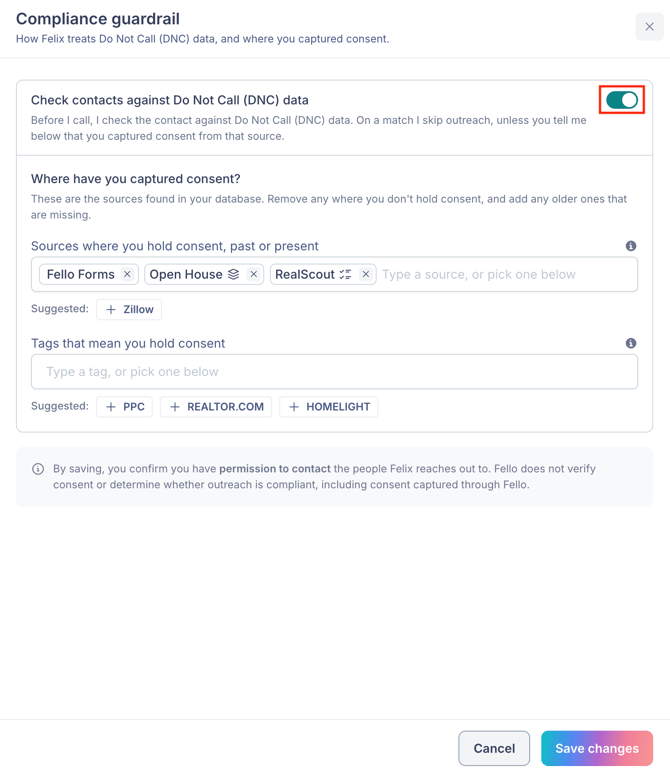
- On: before a call, Felix checks the contact against DNC data. On a match Felix skips outreach, unless the contact matches one of the consent sources or tags you record below.
- Off: Felix does not filter on DNC data. Anything you record under Where have you captured consent? is saved and applies when you turn the check back on.
DNC status comes from the DNC scrubbing that Living Database runs across your database. Learn how to check DNC registration for contacts.
🗒️ Note: The guardrail applies to Sales Agent. Felix Nurture marketing email is not affected. Learn more about Felix Nurture.
🗒️ Note: If your account already used an exclusion to hold back contacts registered on Do Not Call, that setup carried over into the compliance guardrail and the check is on. Accounts without one start with the check off. Review the guardrail once, and check you are not holding back the same contacts twice under Who Felix Skips.
Where have you captured consent?
A DNC registration does not always mean you cannot call. Where a contact gave you explicit permission, you can tell Felix where that permission came from, and Felix keeps those contacts reachable even when DNC data flags them.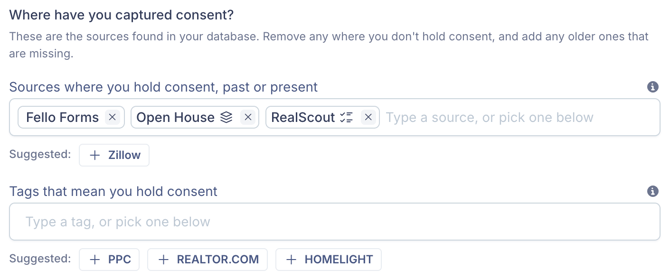
- Sources where you hold consent, past or present: matches the CRM Source on the contact. Fello Forms is added for you when the check is on, and covers contacts who submitted one of your Fello forms. Add older sources too, since contacts imported years ago still carry the source name they arrived with.
- Tags that mean you hold consent: matches the tags on the contact.
You can also record consent when you create a source rule. Selecting I have consent to contact from this source adds the same entry here, and clearing it removes the entry
To add an entry, type the name and press Enter, or select one of the Suggested chips below the field. Suggestions are drawn from source and tag names already present in your database.
🗒️ Note: By saving, you confirm you have permission to contact the people Felix reaches out to. Fello does not verify consent or determine whether outreach is compliant, including consent captured through Fello.
How a source or tag matches
Select any source or tag you have added to open its panel. The panel shows how many contacts it currently covers, and gives you two options: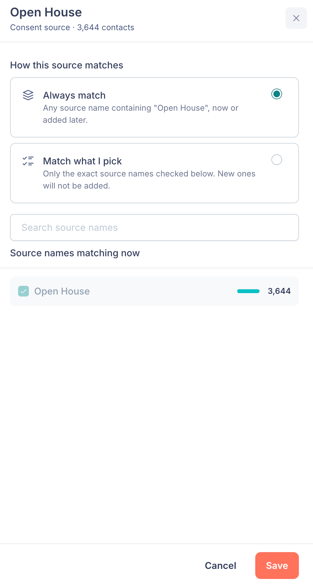
- Always match (default): any name that contains the text you entered, now or added later. Adding "Zillow" this way also covers "Zillow Flex" and any other Zillow variant that appears in your database later.
- Match what I pick: only the exact names you check under Source names matching now. Names added later are not included. Use the search field to find names. You need to select at least one name before you can save.
Click Save when you're ready. The icon on each pill shows its current mode: a layered icon for Always match, a checklist icon for Match what I pick.
🗒️ Note: Fello Forms has no matching options and cannot be opened. If you don't want form submissions treated as consent, remove it with the x.
Examples of consent sources and tags
- A lead vendor or portal where the contact gave permission at sign-up, such as Zillow, Realtor.com, or RealScout.
- Your own lead capture, such as Fello forms.
- A source you no longer buy from. Older contacts still carry that source name, which is what "past or present" covers.
- A tag your team applies when the consent record lives outside Fello, such as a signed agreement with a past client, or a tag applied to a batch on import.
Reach for Match what I pick when one vendor produced several source names in your database and you only hold consent from one of them. Learn how to obtain communication consent from your contacts.
Litigator screening
Before Felix calls or texts a contact, Fello checks the phone numbers on that contact against third-party litigation data. If any of them has a litigation match, Felix does not call or text that contact. Email is not affected, so Felix can still reach that contact by email.
This check is always on. It has no settings, it applies even when you enroll the contact yourself or a workflow enrolls them, and consent sources and tags do not override it.
The Known Litigator attribute
Known Litigator is a system attribute that records whether any current phone number on the contact has a litigation match. Its values are Yes and No, and it can't be edited.
To find flagged contacts, go to the Contacts module from the left sidebar, click Filters, select Known Litigator, and set the condition to is equal to with the value Yes. You can also use is present and is not present to separate contacts that have been checked from those that haven't.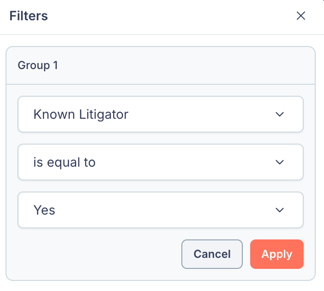
🗒️ Note: Known Litigator is only populated for contacts enrolled in Sales Agent. It stays empty across the rest of your database, so an empty value doesn't mean a contact has been checked and cleared.
Frequently asked questions
- Will Felix call contacts who are registered on the Do Not Call list?
- Only if you allow it. With the DNC check on, Felix skips DNC-registered contacts unless they match a consent source or tag you recorded here. With the check off, Felix does not filter on DNC data at all.
- Does Fello confirm that I have consent to contact someone?
- No. Sources and tags tell Felix where you say consent came from. Fello does not verify consent or determine whether your outreach is compliant, including consent captured through Fello.
- Does the guardrail stop Nurture emails?
- No. It applies to Sales Agent only.
- What happens to a contact who is both covered by a consent source and inside an exclusion?
- The exclusion wins. Felix does not contact them. Learn more about Felix Sales Agent.