
Active vs Monitored contacts
There are two types of contacts in Fello: Active and Monitored. This distinction allows you to better manage your contact tier usage and optimize your marketing efforts.
- Active contacts: These are contacts with full functionality that use up your plan's Active contact limit. By default, all contacts added to Fello are considered Active. You can access their property information, enriched data, and more. Active contacts can also be enrolled in Fello's marketing workflows to drive leads and engagement.
- Monitored contacts: These are non-billable contacts that are not actionable in Fello. Fello continues to enrich them with property and contact data, but they cannot be enrolled in new workflows or included in outreach. Active workflows skip them on sends. Some data points, like AVM (home value), are not viewable until activation and are indicated by a lock icon. You can activate a Monitored contact at any time to resume outreach. Felix can also activate one on its own. When a Monitored contact shows strong enough signals, such as property search activity, a home value inquiry, or re-engagement, Felix marks them Active and begins working them in Sales Agent.
🗒️ Note: Felix will not activate or work a contact that matches one of your Sales Agent exclusion sources. To keep someone out of Sales Agent, add them to an exclusion source rather than relying on their record status. Learn more about exclusions.
You can also stop Felix from activating Monitored contacts altogether. Learn how to control this.
Updating a contact's record status
You can update a contact's status manually at any time. Here's how:
- Go to the Contacts module.
- Select one or more contacts.
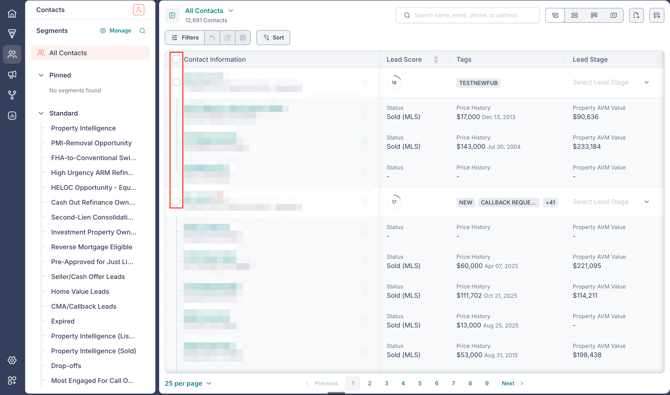
- Click More above the list of contacts.
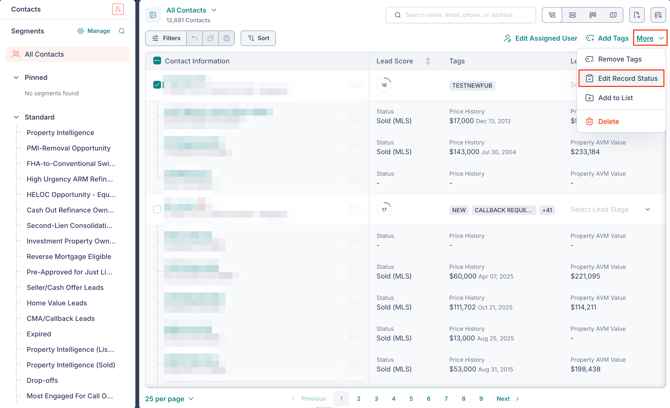
- Select Edit Record Status.
- Select either Active or Monitored.
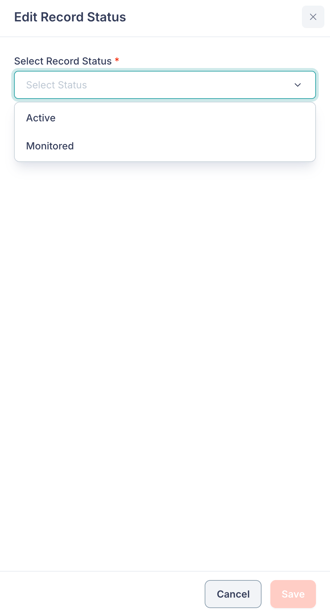
- Click Save.
The record status will be updated for the selected contacts.
You can also filter your contacts by Active or Monitored status. This allows you to focus on the most relevant contacts for your marketing efforts.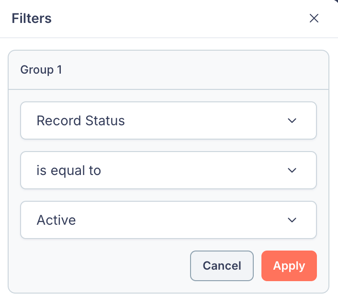
🗒️ Note: When you change a contact's record status, it will be visible to other users in that contact's activity logs. Learn more.
Learn more about optimizing your Active contact usage in Fello.