
What is Felix Nurture?
Nurture is the Felix skill that keeps every contact warm with personalized marketing email. Felix writes and sends one-to-one emails shaped by each contact's property, behavior, and timing, so opportunities surface from your database without you building a single campaign.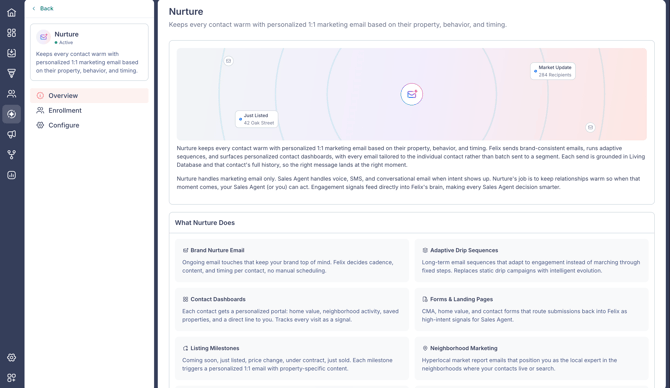
Nurture handles marketing email only. Voice, SMS, and conversational email belong to Felix Sales Agent. The two run independently, so a contact can be in one, both, or neither.
New to Felix? Start with How to set up Felix in Fello, which turns Nurture on as part of onboarding.
In this guide:
- What Nurture does
- How Nurture works
- How Felix decides timing and coverage
- Who Felix works and who Felix skips
- Enroll and unenroll contacts in Nurture
- Configure Nurture
- FAQs
What Nurture does
- Brand Nurture email: ongoing email touches that keep your brand top of mind. Felix decides cadence, content, and timing per contact, with no manual scheduling.
- Adaptive drip sequences: long-term email sequences that adapt to engagement instead of marching through fixed steps, replacing static drip campaigns.
- Contact Dashboards: each contact gets a personalized portal with home value, neighborhood activity, saved properties, and a direct line to you. Every visit is tracked as a signal. Learn how to customize Contact Dashboards.
- Forms and landing pages: CMA, home value, and contact forms route submissions back into Felix as high-intent signals for Sales Agent. Learn how to create landing pages.
- Listing milestones: milestones like coming soon, just listed, price change, under contract, and just sold each trigger a personalized email with property-specific content.
- Neighborhood marketing: hyperlocal market report emails that position you as the local expert in the neighborhoods where your contacts live or search.
- Re-engagement campaigns: Felix detects dormant contacts and re-activates them with a relevant email timed to their lifecycle and recent market movement.
- Engagement signals: opens, clicks, dashboard views, and form submissions feed Felix in real time, surfacing high-intent contacts for Sales Agent.
How Nurture works
- Runs continuously across every Active contact in your database. Marketing email only; Sales Agent handles voice, SMS, and conversational email when intent shows up.
- Every send is grounded in Living Database and the contact's full history, with a brand-consistent voice and signature rather than templates.
- Engagement signals feed Felix's decisions, so marketing and sales draw on the same intelligence instead of running as parallel systems.
- Opt-in is per contact from the Felix AI section. Opt-out is independent of Sales Agent.
How Felix decides timing and coverage
Nurture is signal-driven, not schedule-driven. Felix decides when to email each contact based on that contact's property data, behavior, and lifecycle, rather than sending everyone on a fixed calendar. Every active contact is in scope, so no contact is left without email over time. The timing simply varies from one contact to the next.
For a contact in Nurture only, Felix generally works toward a first email within the first few weeks of enrollment, with the exact day varying per contact. When a contact is also enrolled in Felix Sales Agent, Felix prioritizes the sales conversation first, so the marketing email may come later.
There is no account-level frequency cap. You cannot set a rule such as a maximum number of emails per month, and tagging a contact does not signal a cap to Felix. Felix manages how often it emails each contact based on their engagement.
Nurture content is shaped by your Business Overview. Felix markets only the services you have listed there and will not introduce one you have left out. If you want Felix to mention something like cash offers, add it to your Business Overview in the Felix AI Knowledge section. Learn how in How to set up Felix in Fello.
🗒️ Note: Felix does not run on a set cadence or a committed outreach volume. It reads each contact's signals and does whatever drives the best outcome, so some contacts receive many touches and others receive few. The goal is results per contact, not a uniform schedule.
Who Felix works and who Felix skips
Nurture has no list of segments to choose. Felix works everyone in your active database, minus your exclusions. The top of the Enrollment tab shows the current reach as a count of your active contacts.
To open it: go to Felix AI from the left sidebar, open Nurture under Your Skills, and select the Enrollment tab.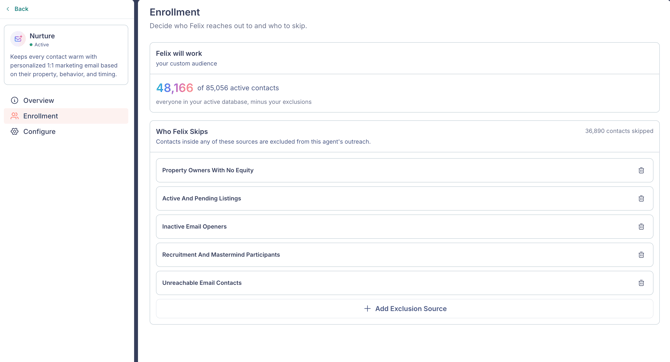
Who Felix skips
Add exclusion sources to keep specific contacts out of Nurture.
- Click Add exclusion source.
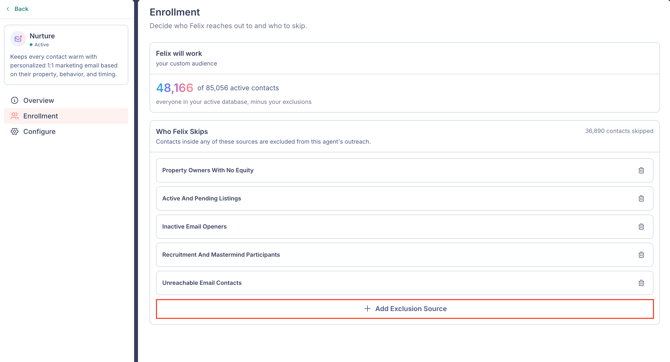
- Choose an Existing segment from the checklist, or switch to Custom filters and build a filter.
- Click Add.
Contacts in any exclusion source are skipped, even when everything else would qualify them.
Enroll and unenroll contacts in Nurture
Felix turns Nurture on across your active database during setup, so most contacts are already covered. Use these controls to manage individual contacts or groups.
From a single contact
- Open a contact to view Contact Details.
- In the Felix AI section, find the Nurture row. It shows Enrolled, Not Enrolled, or Opted Out.
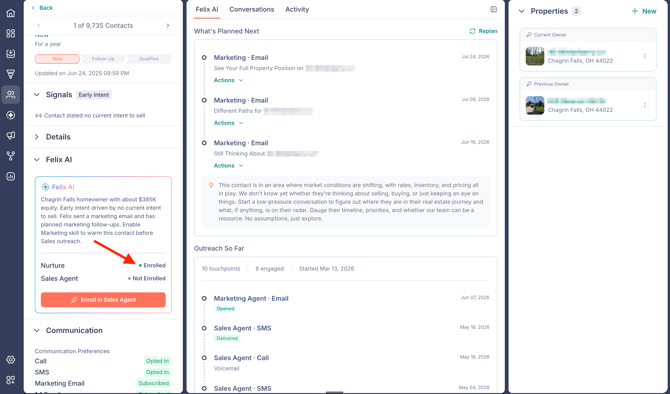
- If it shows Not Enrolled, click to enroll. The status flips to Enrolled right away.
- If it shows Enrolled, use the unenroll control and confirm in the Unenroll Nurture? prompt.
🗒️ Note: Opted Out means the contact no longer receives marketing email, either because they opted out themselves or because a user opted them out in communication preferences. It is separate from their Sales Agent status.
In bulk
- Go to the Contacts module from the left sidebar.
- Select the contacts you want.
- Open the More menu and choose Enroll in Nurture or Unenroll Nurture.
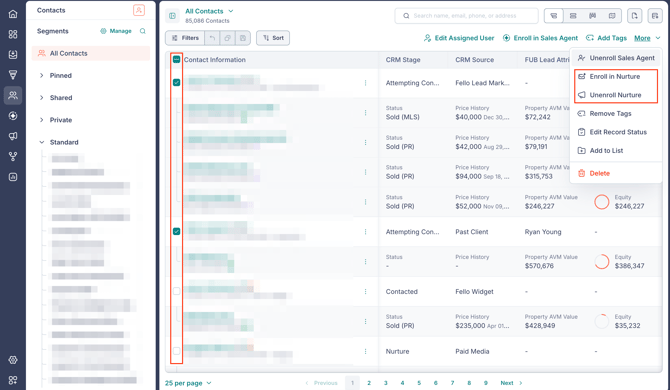
- Confirm in the Enroll in Nurture? or Unenroll Nurture? prompt.
Configure Nurture
Nurture has one setting: Style, which controls how Felix writes marketing emails.
- Go to Felix AI from the left sidebar.
- Open Nurture under Your Skills and select the Configure tab.
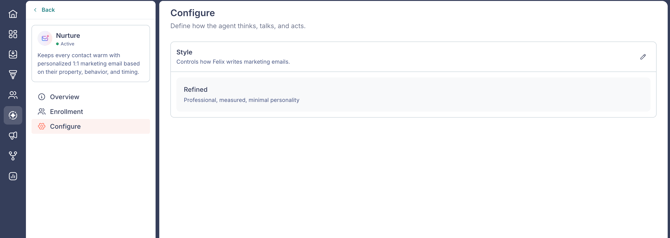
- Open the Style setting and choose one:
- Full: expressive, warm, confident, proactive.
- Balanced: grounded and personable, naturally confident.
- Refined: professional, measured, minimal personality.
Frequently asked questions (FAQs)
- Can Felix Nurture work a contact who only has a phone number?
- No. Nurture needs an email address. Sales Agent can work a contact without an email, but Nurture cannot.
- Will a contact get duplicate emails from Nurture and my workflows?
- No. Smart Send coordinates sends in both directions, so a contact will not receive the same email twice.
- Can Monitored contacts receive Nurture?
- Not while they are Monitored. Only Active contacts receive Nurture email. A Monitored contact can become Active if Felix activates them, and Nurture covers them from that point like any other Active contact.
- Where do I see how Nurture is performing?
- In the Nurture report. See Felix reports in Fello.
- Does Nurture use the notes on a contact?
- No. Nurture builds each contact's email strategy from property and enrichment data, engagement signals, Living Database intelligence, and lifecycle moments. It does not read the free-text Notes field.