
Configure Felix Sales Agent
Felix works out of the box once you enroll contacts. Configuration is where you shape how Felix thinks, talks, and acts on calls: its style, how it opens calls and texts, what it does when a call goes to voicemail, when it hands off to your team, and the hours it can reach out.
To open it, go to Felix AI from the left sidebar, open Sales Agent under Your Skills, and select the Configure tab.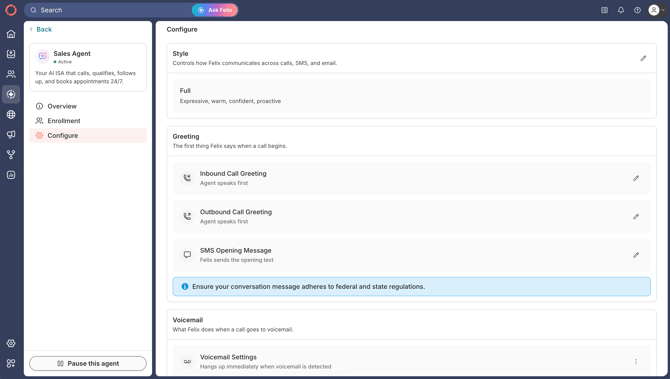
🗒️ Note: Configuring Felix requires account settings access. Learn more about roles and permissions.
In this guide:
Style
Style sets how Felix sounds across calls, texts, and emails. Select the edit (pencil) icon, then choose one: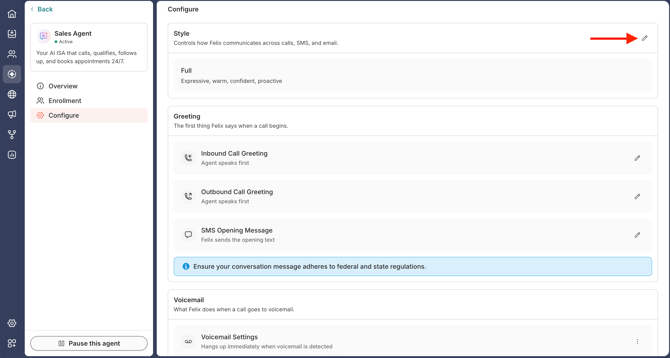
- Full: expressive, warm, confident, and proactive.
- Balanced: grounded and personable, naturally confident.
- Refined: professional, measured, and minimal personality.
Greetings
Set how Felix opens a call or text. You can configure the Inbound Call Greeting and the Outbound Call Greeting separately. Select the Edit (pencil) icon on the one you want to change.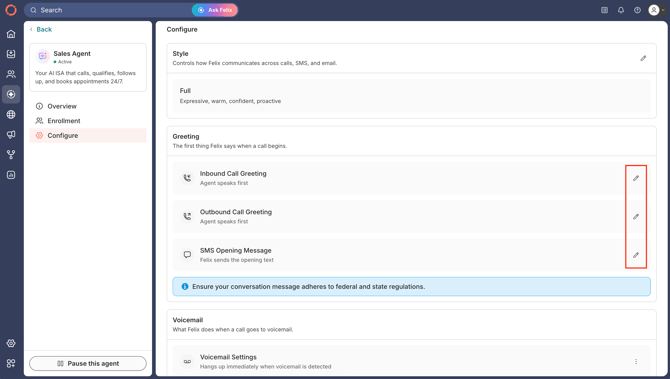
Inbound call greeting
Choose a Mode for how Felix opens an inbound call: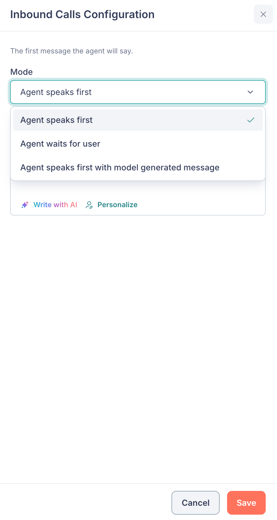
- Agent speaks first: Felix opens with the exact Message you write.
- Agent waits for user: Felix waits for the caller to speak first. No message needed.
- Agent speaks first with model generated message: Felix generates its own opener. Add an optional Instruction to guide it.
For the modes that take a custom message, use Personalize to insert variables such as the contact's name, the agent's name, and your business name, and use Write with AI to draft it.
Outbound call greeting
Choose what Felix says when a contact picks up.
Select Standard greeting (recommended) to have Felix craft a natural opener for each call, or Custom message to write exactly what Felix says on every call.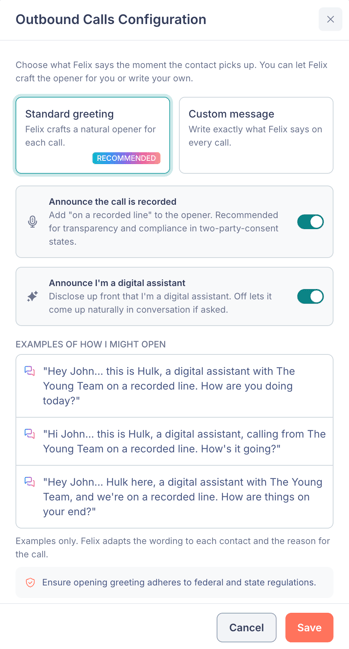
Standard greeting:
Turn on either disclosure, or both, depending on your compliance needs: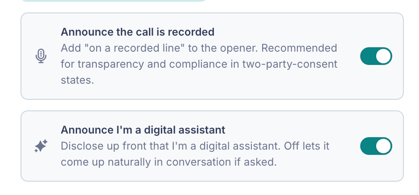
- Announce the call is recorded: adds "on a recorded line" to the opener. Recommended for transparency, and for two-party-consent states.
- Announce I'm a digital assistant: discloses up front that Felix is an AI. With it off, this can come up naturally if a contact asks.
Under Examples of how I might open, Felix shows sample openers that update as you change the toggles. These are examples only. Felix adapts the wording to each contact and the reason for the call.
Custom message:
Write your own opener in the Custom message field, using Personalize to insert variables and Write with AI to draft it. 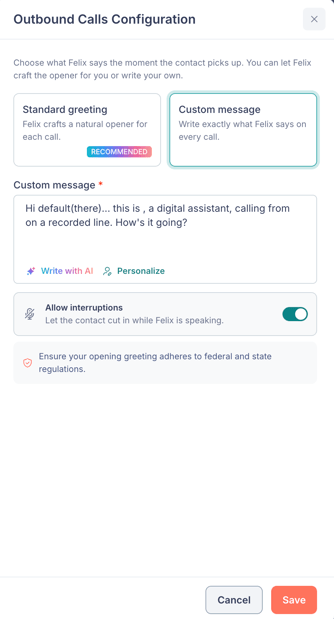
The Allow interruptions toggle lets the contact cut in while Felix is speaking. Turn it off so Felix reads the full message without interruption, which is useful when your custom greeting includes compliance language that must be delivered in full.
🗒️ Note: Make sure your call greetings follow federal and state regulations.
SMS opening message
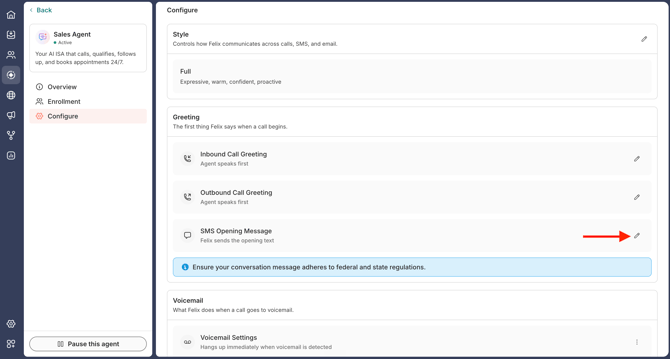
Turn on Disclose I’m a digital assistant to have Felix say it’s a digital assistant in the first text. With it off, Felix doesn’t bring it up unless a contact asks.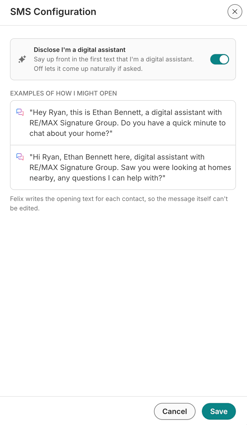
🗒️ Note: Felix writes each opening text itself, so the message can’t be edited.
Voicemail
What Felix does when a call goes to voicemail. Click the 3-dot icon on Voicemail Settings and select Edit, then choose:
- Hang up if reaches voicemail.
- Leave a message if reaching voicemail. Then, under How should the agent decide what to say?, choose how Felix decides:
- Automatically (recommended): Felix chooses what to say based on the call context.
- Based on a prompt: Felix uses your instructions to generate the voicemail.
- Use a static message: Felix says the same thing every time.
Handoffs
Handoffs are the situations in which Felix hands a contact to a human, managed in one place across every Felix skill. This section lists the handoff reasons that apply to Sales Agent. Select Manage handoffs to open them in a new tab. Learn more about handoffs.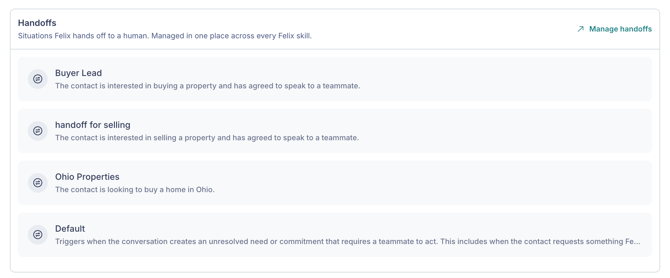
Calling and SMS window
Set the days and hours Felix can place outbound calls and send texts. To do this, click Edit (pencil icon) Calling & SMS Window.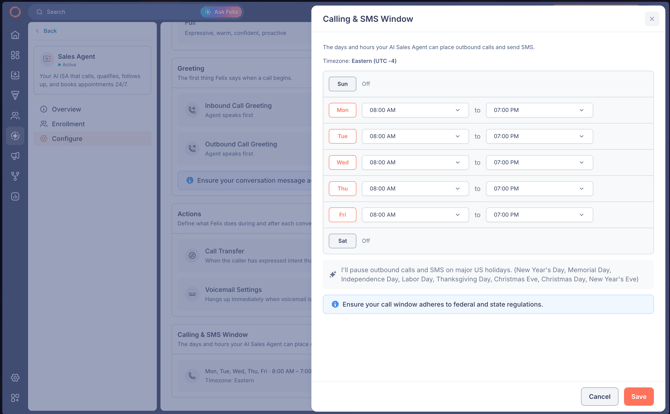
- For each day, turn it on or off and set start and end times. By default, Felix works Monday through Friday, 8:00 AM to 7:00 PM, with Saturday and Sunday off.
- Set your Timezone. The window is based on your account's timezone, not each contact's local time.
🗒️ Note: Felix pauses outbound calls and texts on major US holidays: New Year's Day, Memorial Day, Independence Day, Labor Day, Thanksgiving Day, Christmas Eve, Christmas Day, and New Year's Eve. Your window applies to outbound only. Felix picks up if a contact calls the direct line, and replies once to an inbound text, at any hour.
🗒️ Note: Make sure your call window follows federal and state regulations.
Frequently asked questions
- Can Felix leave a voicemail?
- Yes. In Voicemail settings, choose Leave a message if reaching voicemail, then choose whether Felix decides what to say automatically, from a prompt, or with a static message.
- Yes. In Voicemail settings, choose Leave a message if reaching voicemail, then choose whether Felix decides what to say automatically, from a prompt, or with a static message.
- What does Felix say if a contact has no name in Fello?
- Felix phrases around the missing name rather than reading a blank or a placeholder. A contact with no name on file hears an opener like "Hi there" instead of a stand-in such as "Hi No Name." Conversations continue normally from there.
- Can I have Felix open inbound and outbound calls differently?
- Yes. The Inbound Call Greeting and Outbound Call Greeting are configured separately.
- Does the calling and SMS window apply to each contact's local time?
- No. The window is based on your account's timezone.