
Signals are the changes and patterns Felix detects on a contact: equity and tenure, a recent move or sale nearby, a new mortgage or refinance, a form submission, or a reply to outreach. Intent is a single label that sums up how ready that contact looks to act. Together they surface your best opportunities automatically, so the right contacts rise to the top instead of sitting unnoticed in a static list.
Felix detects signals through Living Database, its always-on skill that watches every contact and property in your database and updates the data continuously. Learn more about Living Database.
In this article:
- Intent levels
- Where you see signals and intent
- How Felix uses intent
- Filter and segment by intent
- FAQs
Intent levels
Each contact carries a Signal Intent value that reflects how strong and timely its signals are:
- Early Intent: Light, early signals are present and worth watching.
- Medium Intent: Stronger signals suggest the contact is worth a closer look.
- High Intent: Strong, timely signals suggest the contact is ready to act.
Intent updates on its own as Living Database detects new activity, so a contact can move between levels over time.
🗒️ Note: Signal Intent replaces Fello's previous Lead Score. Where you used to read a numeric lead score, you now read intent: Early, Medium, or High. Existing workflows and integrations that referenced lead score continue to run, now driven by intent.
Where you see signals and intent
On a contact. Open any contact to see the Signals section in Contact Details. It shows the intent badge along with one or more signal lines describing what Felix detected, such as a long-tenure owner with high equity, or a recent home value form submission.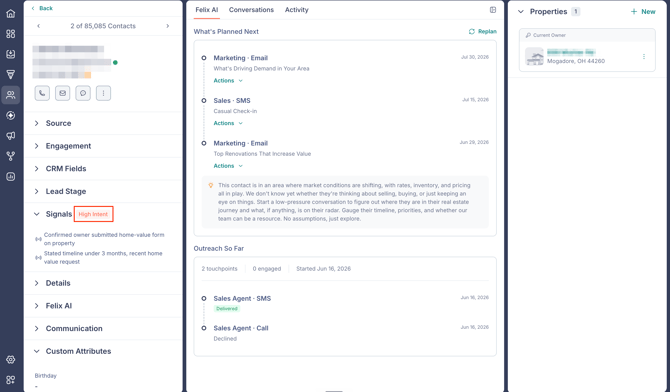
On the Home dashboard. The Living Database card cycles through individual contacts, each with its intent badge and a one-line reason, giving you a live view of opportunities as they surface.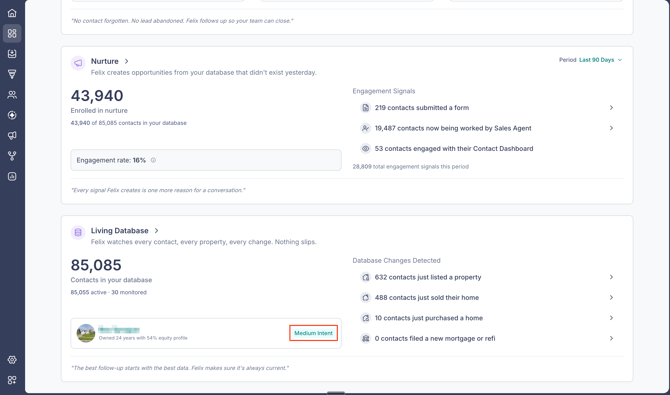
How Felix uses intent
Intent does not decide whether Felix works a contact. Enrollment in Sales Agent decides that. What intent shapes is priority and pace: Felix works your highest-intent contacts first, and new high-intent contacts queue automatically as they come in. Signal strength then sets the cadence of follow-up rather than whether follow-up happens at all. Learn more about Felix Sales Agent.
Filter and segment by intent
You can filter your contacts by intent to build focused lists for outreach.
- Go to Contacts from the left sidebar.
- Click Filters.
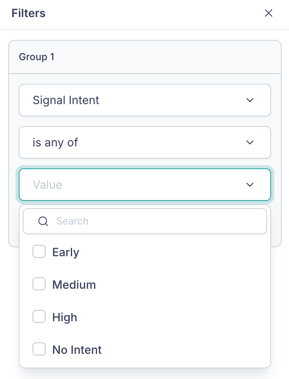
- In Group 1, open the attribute dropdown and select Signal Intent.
- Keep the operator as is equal to.
- Open the Value dropdown and select Early, Medium, High, or No Intent.
Save the filter as a segment to reuse it and enroll it in Sales Agent or Nurture. Learn more about creating and managing segments. For all the ways to filter, see how to filter your contacts.
Frequently asked questions
- What does No Intent mean?
- Felix has not detected a qualifying signal for that contact yet. Living Database keeps watching, so the contact can gain an intent level as new activity appears.
- Does intent control whether Felix reaches out?
- No. Enrollment in Sales Agent controls whether Felix works a contact. Intent influences how soon and how often Felix follows up.
- How often does intent update?
- It updates automatically as Living Database detects new signals, so a contact's level can change over time.
- Can I build a segment from intent?
- Yes. Filter on the Signal Intent attribute, then save the filter as a segment to reuse and enroll it.
- Yes. Filter on the Signal Intent attribute, then save the filter as a segment to reuse and enroll it.