
Smart Sending is a Fello feature that automatically skips contacts who are unlikely to engage with your email, such as unengaged contacts or those who have been emailed recently. By filtering out these contacts, Smart Sending helps protect your sender reputation, reduces the risk of spam complaints, and improves the chances that your emails reach the inboxes of contacts who are most likely to engage.
In this article:
How Smart Sending works
When Smart Sending is enabled, Fello evaluates your recipients and skips contacts based on signals like whether the contact has recently received emails from you, or whether they have engaged with your past emails.
Sending to contacts who are unlikely to engage, or who have been emailed too frequently, can hurt your deliverability over time. Recipients are more likely to mark your emails as spam, and email providers may flag your sending patterns as suspicious. Smart Sending helps prevent these outcomes by sending only to contacts most likely to respond.
Where Smart Sending applies
Smart Sending is available for both regular (one-time) emails and automated emails sent via workflows. The toggle appears in different places depending on the type of email.
Regular (one-time) emails
For regular emails, the Smart Sending toggle is located in the Send panel on the email review page.
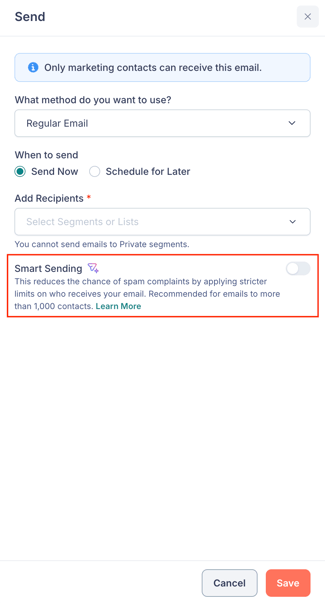
🗒️ Note: Smart Sending is applied on top of Fello's standard exclusion rules, which apply to every regular email regardless of Smart Sending. Learn more about why contacts are excluded from emails.
Automated emails in workflows
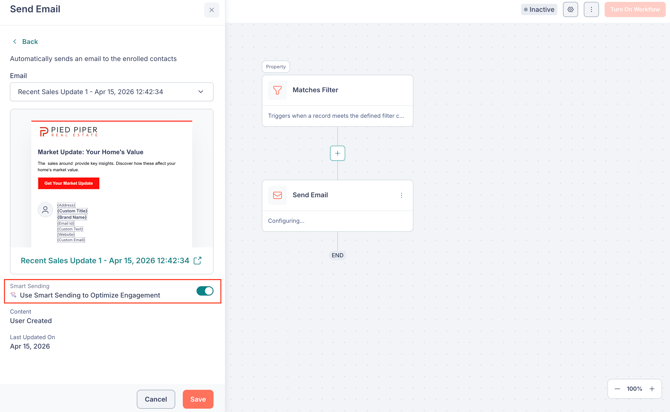
For emails sent through workflows, the Smart Sending toggle is located within the Send Email action of your workflow.
When to use Smart Sending
Smart Sending is especially helpful when sending to large audiences. For regular emails to more than 1,000 contacts, using Smart Sending is recommended to help protect your deliverability.
For smaller sends, Smart Sending can still be useful if you want to avoid reaching out to contacts who are unlikely to engage. For example, after running a high-volume campaign when you want to give unengaged contacts a break before your next email.
If you require further assistance, please don't hesitate to contact Fello support (support@fello.ai).