You can use Fello to check if your contacts are registered on the National Do Not Call (DNC) Registry. This can help you avoid unwanted violations and align your outreach efforts accordingly. DNC checks are done as part of Living Database.
If you use Felix Sales Agent, DNC status also controls whether Felix reaches out. Felix can check each contact against DNC data before calling and skip anyone who matches, unless you have recorded where you hold consent. Learn more about the compliance guardrail.
Once Living Database is turned on, your contacts with valid phone numbers will start being checked against the DNC registry. It may take 24-48 hours to see initial results after enabling. The DNC status for contacts will continuously be updated over time as new data becomes available.
To check the DNC status of a contact:
- Go to the Contacts module.
- Check the phone icon next to a contact.
You can quickly identify if a contact has registered on DNC or not with the green or red dot that's displayed over this icon.- Green Dot: The contact has not registered on DNC.
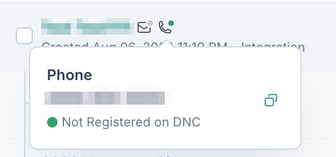
- Red Dot: The contact has registered on DNC.
- No Dot: The contact has an invalid phone number, or hasn't been checked for DNC registration yet.
- Green Dot: The contact has not registered on DNC.
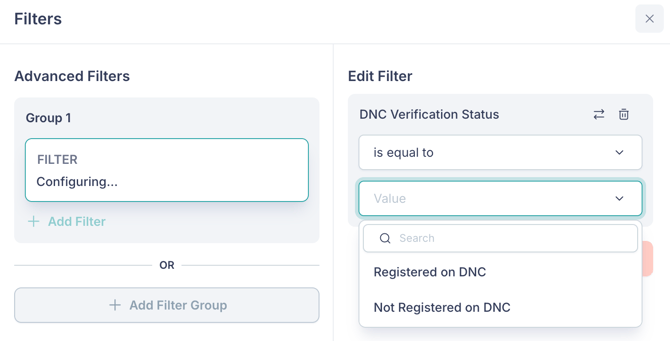
💡 Tip: You can search for contacts by applying filters based on DNC registration. You can do this by clicking on the filter icon and searching for "DNC Verification Status".