
Collaborators are teammates who can access a contact alongside the person or team it's assigned to. Use them when someone else works the contact with you, such as a lender, a transaction coordinator, or an ISA, without changing who the contact is assigned to.
In this article:
- How collaborators work
- Add or remove collaborators
- Add a collaborator by mentioning them in a note
- Track specific roles with a Fello Users attribute
- Filter contacts by collaborator
How collaborators work
- A collaborator can access the contact's record, even if the contact isn't assigned to them.
- Adding a collaborator doesn't change the contact's assignee.
- Collaborators don't change how Felix works with the contact.
Add or remove collaborators
- Go to Contacts from the left sidebar and open the contact.
- In the Details section, click Add Collaborators under Collaborators.
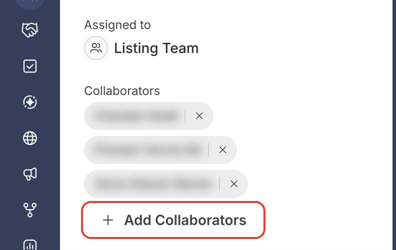
- Select one or more users, then click Add Collaborators.
To remove a collaborator, click the x next to their name.
Add a collaborator by mentioning them in a note
Mentioning a teammate in a note on the contact adds them as a collaborator.
- Open the contact and select the Conversations tab.
- Select Notes, type @, and choose a teammate from the list.
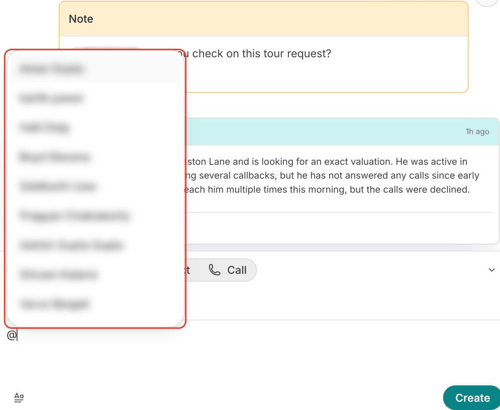
- Finish your note and click Create.
💡 Tip: If the new collaborator doesn't appear under Collaborators right away, refresh the page.
Track specific roles with a Fello Users attribute
For roles you track on many contacts, such as Lender or Transaction Coordinator, create a custom attribute with the Fello Users type. Users selected in it can access the contact, just like collaborators, and the attribute name shows their role.
- Click Settings from the bottom-left corner, then select Objects under Data.
- On the Contacts tab, click Create Attribute.
- Enter a Name, such as Lender.
- Under Attribute Type, select Fello Users.
- Under How many users can be selected, choose Single user or Multiple users.
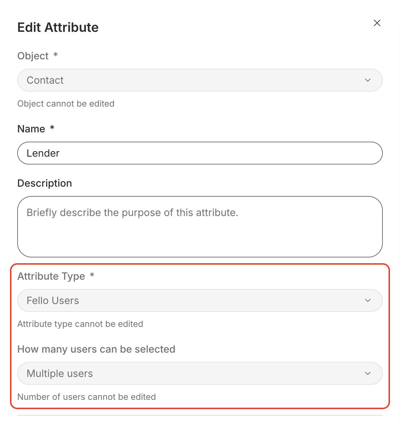
- Click Save.
🗒️ Note: The attribute type and the number of users can't be changed after you save. Learn more about attributes.
Filter contacts by collaborator
In Contacts, add the Collaborators filter to find contacts by collaborator. It supports is any of, is none of, is present, and is not present. Custom Fello Users attributes, such as Lender, are available as filters too. See all assignment filters.
Related: Teams in Fello (Complete Guide) · How to manage permissions and permission sets in Fello