
In this article:
- What is Email Health?
- Email Health Status Levels
- Viewing Your Email Health
- Understanding Your Monthly Email Limit
- How to Improve Your Email Health
- FAQs
What is Email Health?
Email Health is a dynamic measure of your reputation as an email sender. It reflects how much your recipients value your emails based on their interactions — including opens, clicks, and replies.
Your Email Health status directly impacts how many emails you can send each month. The better your Email Health, the higher your monthly sending limit. This system is designed to reward responsible sending behavior and help you maintain strong deliverability over time.
🗒️ Note: Email Health is calculated automatically by Fello based on engagement signals and sending patterns. It is updated periodically to reflect your current sender reputation.
Email Health Status Levels
Email Health has four possible status levels. Each level corresponds to a different monthly sending capacity, expressed as a multiplier of your plan's total Active contact limit.
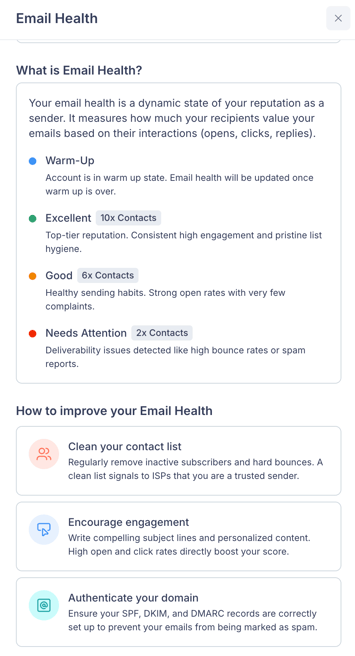
Warm-Up
Your account is in warm-up state while Fello establishes your sender reputation. During this phase, your Email Health status will be updated once warm-up is complete. Learn more about how your account is warmed up.
🗒️ Note: While in warm-up, you won't see specific monthly limits displayed. Fello manages your sending volume automatically to protect your reputation during this period.
Needs Attention
Monthly Email Sends: 2x Contacts
This status indicates that deliverability issues have been detected, such as high bounce rates, spam reports, or extended periods of inactivity. Your monthly sending limit is set conservatively to help protect your sender reputation while you address the underlying issues.
Good
Monthly Email Sends: 6x Contacts
This status reflects healthy sending habits. You have strong open rates with very few complaints. Your monthly sending limit is set at a standard level appropriate for consistent, engaged senders.
Excellent
Monthly Email Sends: 10x Contacts
This is the top-tier status. You have consistent high engagement and pristine list hygiene, which earns you the highest monthly sending limit available.
Viewing Your Email Health
You can view your current Email Health status and monthly sending capacity from the Email Health panel. To access this:
- Go to Marketing > Emails.
You can view your monthly email sending limit from the top-right corner. - Click on your Monthly Limit to access the email health panel.
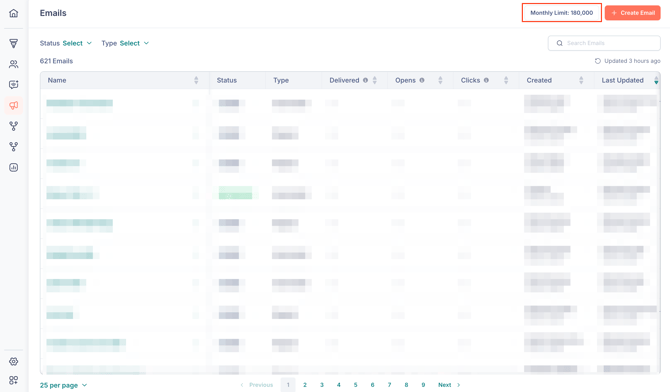
Here, you can view your Email Health status, your monthly email sends, along with your monthly email usage.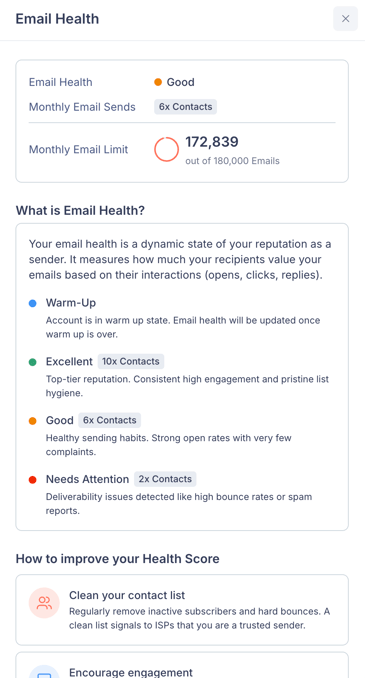
🗒️ Note: The number shown next to Monthly Email Limit is how many emails you have remaining to send this month, out of your total monthly cap. For example, "172,839 out of 180,000" means you have 172,839 emails remaining this month, having sent around 7,161 of your 180,000-email cap so far.
Understanding Your Monthly Email Limit
Your monthly email limit is calculated based on your Email Health status and the total Active contact limit available in your plan. For example, if you're on the Scale plan, with a total capacity for 10,000 Active contacts and your Email Health is Good (6x Contacts), your monthly limit would be 60,000 emails.
| Email Health Status | Monthly Sends Multiplier | Example (10,000 contacts) |
|---|---|---|
| Needs Attention | 2x Contacts | 20,000 emails/month |
| Good | 6x Contacts | 60,000 emails/month |
| Excellent | 10x Contacts | 100,000 emails/month |
🗒️ Note: Your monthly limit resets at the beginning of each month. If you reach your limit before the month ends, any automated emails that are supposed to be sent will be skipped until your limit refreshes. You can find when emails have been sent or skipped from a contact's activity log.
How to Improve Your Email Health
Improving your Email Health unlocks higher monthly sending limits. Here are three key actions you can take:
1. Clean your contact list
Regularly remove inactive subscribers and hard bounces from your database. A clean list signals to ISPs (Internet Service Providers) that you are a trusted sender and helps reduce bounce rates.
💡 Tip: Use Fello's segmentation tools to identify contacts who haven't engaged with your emails in the past 6–12 months and consider removing them from active campaigns.
2. Encourage engagement
Write compelling subject lines and personalized content that your recipients want to read. High open and click rates directly boost your Email Health.
💡 Tip: Fello's Smart Content feature can help you automatically refresh email content to keep campaigns relevant. Learn more about Smart Content.
3. Authenticate your domain
Ensure your SPF, DKIM, and DMARC records are correctly set up to prevent your emails from being marked as spam. Proper authentication builds trust with email providers and improves deliverability. Learn how to set up your email sending domain.
Related: Email Compliance & Best PracticesFrequently Asked Questions (FAQs)
- How often is Email Health updated?
- Email Health is recalculated periodically based on your sending behavior and recipient engagement. You don't need to take any action to trigger an update.
- What happens if I reach my monthly email limit?
- Once your monthly limit is reached, any remaining emails — including one-time sends and automation emails — will be skipped until your limit resets at the start of the next month.
- Why don't I see a monthly limit during warm-up?
- During the warm-up phase, Fello manages your sending volume automatically to safely establish your sender reputation. Your Email Health status and monthly limits will become visible once warm-up is complete.
- Can my Email Health status change over time?
- Yes. Your status can improve if you follow best practices like cleaning your list and encouraging engagement. It can also decline if deliverability issues arise, such as increased bounces or spam complaints.