
When you send a regular (one-time) email in Fello, you select a segment or list as your recipients. You may notice that the estimated recipient count is lower than the total number of contacts in that segment or list.
This is because Fello automatically excludes certain contacts from the send to protect your sender reputation and email deliverability. You'll see this reflected in the Send panel after selecting your recipients:
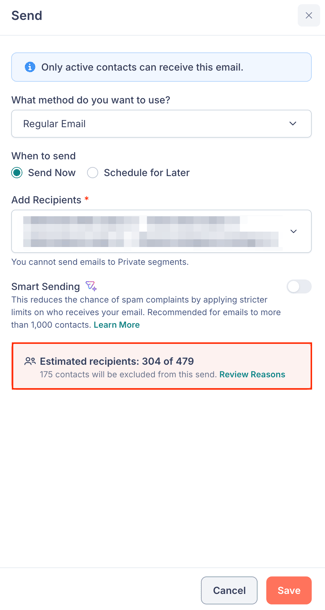
Click Review Reasons to open a panel that lists each exclusion reason along with the number of contacts affected.
In this article:
Why does Fello exclude contacts?
Sending emails to contacts who should not be contacted – or who are unlikely to engage – can lead to spam complaints, high bounce rates, and reduced inbox placement. Over time, this damages your sender reputation and makes it harder for your emails to reach anyone's inbox.
To prevent this, Fello evaluates every contact in your selected recipients and automatically excludes those who meet certain criteria.
Exclusion reasons
Here are some of the reasons a contact may be excluded from a regular (one-time) email send:
Invalid Emails
The contact's email address cannot be validated or is formatted incorrectly. Sending to invalid addresses increases your bounce rate, which directly damages your sender reputation.
Monitored Contacts
The contact's record status is set to Monitored in Fello. Monitored contacts are not actionable, so they cannot receive emails. Learn more about Active vs Monitored Contacts.
Missing Emails
The contact does not have an email address in your database. Without a valid email address on file, there's no way to deliver the email.
Unsubscribed
The contact has unsubscribed from your emails. Sending to unsubscribed contacts violates email compliance standards and can result in serious deliverability penalties. These contacts are always excluded regardless of any settings.
🗒️ Note: These exclusion reasons apply to every regular (one-time) email send, whether Smart Sending is on or off.
Smart Sending
Smart Sending adds an extra layer of exclusion on top of the reasons listed above. When Smart Sending is enabled, Fello also skips contacts who are unengaged or have been recently emailed, to further protect your sender reputation and improve deliverability.
When the Smart Sending toggle is on and contacts are excluded for this reason, you'll see an additional Smart Sending row in the Review Reasons panel showing how many contacts were skipped.
Smart Sending is recommended when sending to more than 1,000 contacts. You can enable it using the Smart Sending toggle in the Send panel.
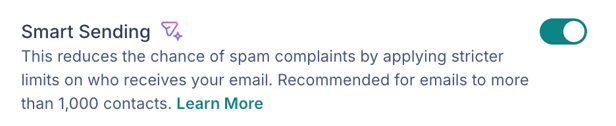
To learn more about how Smart Sending works, see What is Smart Sending in Fello?.
If you require further assistance, please don't hesitate to contact Fello support (support@fello.ai).