
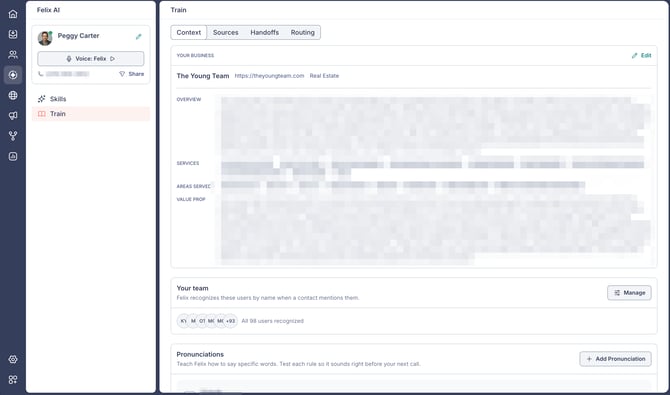
The Context tab on Felix's Train page is where you shape how Felix represents your business. You can review the business context Felix uses in conversations, choose which team members Felix recognizes, and teach Felix how to pronounce specific words. You can update it any time after setup.
The Sources tab on the same page is where you tell Felix which sources and tags to work and how. Learn more about sources.
In this guide:
- Open the Train page
- Review your business details
- Choose which team members Felix recognizes
- Add and manage pronunciations
Open the Train page
Here's how to get to the Train page:
- Go to Felix AI from the left sidebar.
- Select Train from the Felix AI menu, then open the Context tab.
Review your business details
The Your Business section shows the context Felix uses to decide what to say and why: an Overview, your Services, the Areas Served, and your Value Prop.
Here's how to update these details:
- Select Edit in the top-right corner of the Your Business section.
- In Edit Business, enter your website and select Analyze Website to auto-fill the fields.
- Review and edit your Business Name, Industry, Business Overview, the products or services you specialize in, and what makes you the right choice.
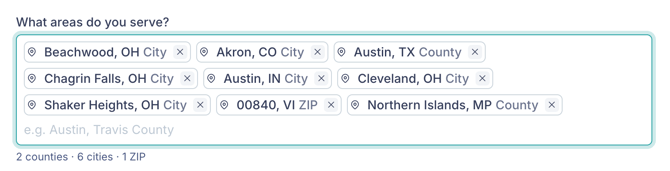
- Under What areas do you serve?, review your serviceable areas. Each one is a city, county, or state, with its type shown next to the name. To add an area, start typing and select a match from the suggestions. Some names match more than one place (searching Cleveland returns both a city and a county), so check the type and state before you select. To remove an area, select the x on it. The count below the field shows how many of each type you've added.
- Select Save.
🗒️ Note: Felix uses your serviceable areas to understand which properties are in your market. They don't limit which contacts Felix works with. A contact whose properties are all outside your areas can still talk with Felix, whether about buying in your market or about a property outside it. To restrict outreach to an area, use an exclusion.
🗒️ Note: You first set up these details when you configured Felix. For the initial setup, see How to set up Felix in Fello.
Choose which team members Felix recognizes
The Your team section controls which users Felix recognizes when a contact mentions someone by name. Contacts often ask whether the agent they worked with is still around, and with your team in place, Felix can confirm that person by name instead of saying it doesn't know them. This applies across Felix's outreach, including calls and texts.
Every account starts with everyone recognized, so there's nothing to set up. The section shows a preview of the recognized users and a count.
Here's how to change who Felix recognizes:
- In the Your team section, select Manage.
- Select All users to recognize everyone in your account, including anyone added later.
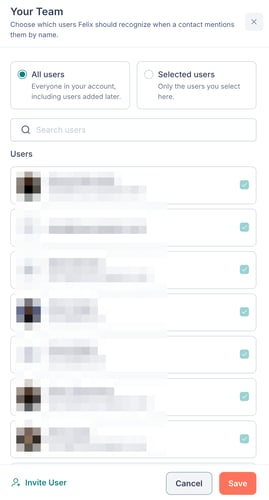
- Select Selected users to recognize specific people only, then use Search users or scroll the Users list and tick each person you want Felix to recognize. The count above the list updates as you go, and Clear all deselects everyone so you can start over.
- Select Save.
You can switch between the two options or update your selection any time as your team changes.
🗒️ Note: Suspended users don't appear in the picker, and users who are suspended or deleted are removed from Felix's recognized list automatically.
💡 Tip: To recognize someone who isn't in your account yet, select Invite User at the bottom of the panel. Learn how to add and manage users.
Add and manage pronunciations
Pronunciations teach Felix how to say a tricky name or word out loud, such as a team name or a local place, so it sounds right on calls.
Here's how to add a pronunciation:
- In the Pronunciations section, select + Add Pronunciation.
- Enter the Word you want Felix to say correctly.
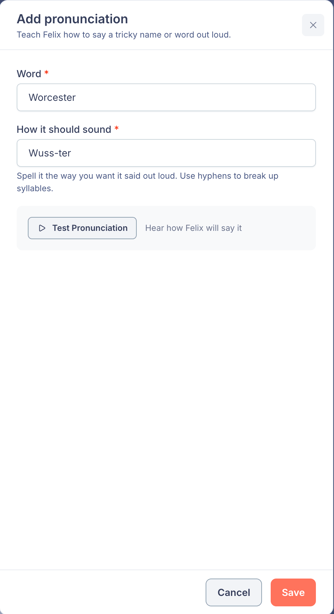
- In How it should sound, spell it the way you want it said out loud. Use hyphens to break up syllables.
- Select Test Pronunciation to hear how Felix will say it.
- Select Save.
Saved pronunciations appear in the Pronunciations list. For any pronunciation, select the play icon to hear it, Edit to change it, or Delete to remove it.