
Felix works each contact across calls, texts, and emails until they are ready for a teammate. A handoff is the moment Felix flags a contact as ready for human follow-up: Felix stops its own outreach and brings in a teammate to take it from there.
A warm transfer is the live-call version of that moment. On a call, Felix introduces the contact to a teammate before stepping off, so the person picks up with context instead of starting cold.
This guide covers the full handoff lifecycle, how to route and configure call transfers, and how to get notified.
In this guide:
- How a handoff works
- Warm transfers and cold transfers
- Set up call transfer routing
- Get notified when Felix hands off
- Take over from Felix manually
- FAQs
How a handoff works
As Felix works a contact through Sales Agent, the contact moves through these stages: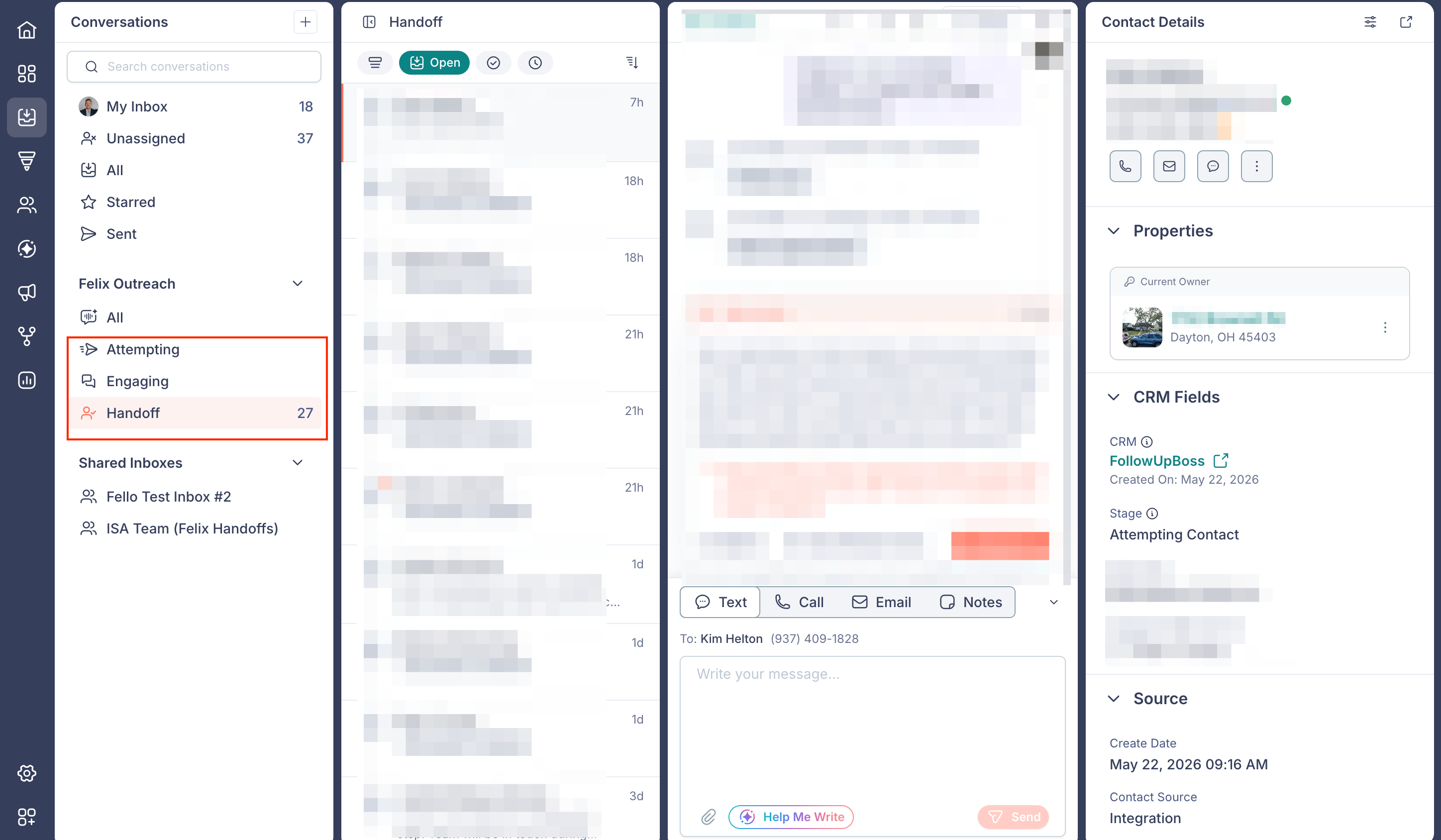
- Attempting: Felix is reaching out and has not had a response yet.
- Engaging: The contact has responded and is in an active conversation.
- Handoff: The contact is ready for a teammate, and Felix has stepped back.
- Pending: Felix is holding the contact rather than actively working them, with the reason recorded. Felix brings them back into rotation on its own when it is time to reach out again. Learn more about Pending contacts.
When a contact reaches the Handoff stage, Felix notifies your team and the conversation appears in the Handoff inbox in Conversations for a teammate to pick up. From that point, Felix stops its own outreach and your team takes the follow-up from there. A handoff is not permanent. You can enroll the contact in Sales Agent again at any time, including through a workflow. Learn more about enrolling contacts in Sales Agent
Learn more about Conversations.
Warm transfers and cold transfers
When a contact is ready during a call Felix places, Felix will usually try to connect them with a teammate right then rather than arranging follow-up for later. If the contact says they can't talk in the moment, Felix arranges to reach them another time.
Felix can transfer the call in one of two ways:
- Warm transfer: Felix introduces the contact with a brief handoff message, then connects them to the teammate.
- Cold transfer: Felix connects the call to the teammate without an introduction.
Warm transfers come from Felix's direct line, the dedicated number on your team's contact card, not from the rotating numbers Felix uses for outreach. Share Felix's contact card so your team recognizes the number when a transfer comes in
Set up call transfer routing
Call transfer routing decides who picks up when a contact is ready to talk. You set it during Felix setup, and you can change it anytime under Sales Agent configuration.
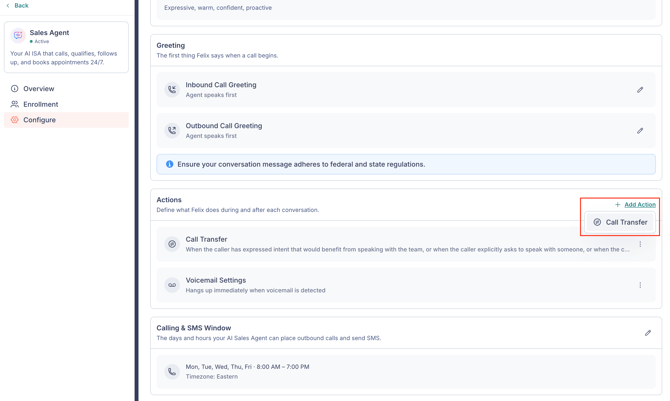
- Go to Felix AI from the left sidebar.
- Open Sales Agent under Your Skills, then select the Configure tab.
- Under Actions, add a Call Transfer action, or edit an existing one from its 3-dot menu.
In the Call Transfer panel, set the following: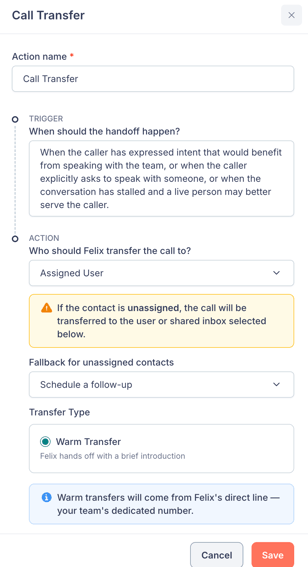
- Action name: Name the action so you can recognize it in the list.
- Trigger: Describe when the handoff should happen, such as when the contact asks to speak with someone or the conversation is ready for a teammate.
- Who Felix transfers to: Choose where the call goes.
- Assigned User: Felix transfers to the user assigned to the contact. Set a Fallback user for unassigned contacts so calls for contacts with no user assigned still reach someone. Any user with a phone number configured can be the fallback.
- Specific User: Felix always transfers to one chosen user.
- Shared Inbox: Felix routes to a team shared inbox, so the first available teammate takes it. You create shared inboxes in Conversations. Learn more about shared inboxes.
- Transfer Type: Choose Warm Transfer or Cold Transfer.
You can add more than one Call Transfer action when different situations should route to different teammates. Felix runs only one transfer per call, choosing the action whose Trigger best matches the conversation.
To route by intent, describe the intent in each action's Trigger. For example, create one action whose Trigger describes buyer intent and point it to your buyers shared inbox, then create another whose Trigger describes seller intent and point it to your sellers shared inbox. Keep one Call Transfer action with a broad Trigger as a catch-all, so conversations that don't clearly match either intent still reach a teammate.
Because Felix matches on the Trigger text, routing by contact attributes such as state or zip code is not available today.
🗒️ Note: Configuring Felix requires account settings access. Learn more about roles and permissions.
Get notified when Felix hands off
You choose whether Felix notifies you on just your own handoffs or on every handoff across the account. Each teammate sets their own handoff alerts, so people only hear about the handoffs that matter to them.
To adjust your handoff alerts, go to Settings > Notifications and find the Handoff topic under Felix AI. You can set the scope and turn on In-App, Email, or both. Learn more about notifications.
Take over from Felix manually
You do not have to wait for a handoff. Open the contact in Conversations and click Take over on the Felix activity card, then confirm in the Take over from Sales Agent? prompt.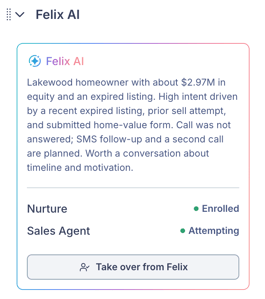
Sales Agent stops working that contact, and the conversation becomes yours to manage. Learn more about taking over a conversation.
Frequently asked questions
- Can Felix transfer an inbound call?
- Warm and cold transfers apply to calls Felix places. Felix answers inbound calls on its own number but cannot transfer an inbound call to a teammate today.
- Are call recordings and transcripts synced to my CRM?
- No. Call recordings, transcripts, and Felix's conversation activity stay in Fello.
- What is the difference between a warm and a cold transfer?
- On a warm transfer, Felix introduces the contact before connecting them. On a cold transfer, Felix connects the call without an introduction.
- What happens if the assigned user doesn't pick up a transfer?
- Felix schedules a call back with the contact for later. The transfer is not rerouted to another teammate.
- Do I need a Copilot seat to receive a handoff?
- No. A teammate with a phone number configured can receive a transferred call. To call, text, or email the contact yourself in Fello after the handoff, you need a Copilot seat. Learn more about Copilot seats.
- Does my team get a call on every handoff?
- No. A teammate is called only on a live transfer, which happens during a call when the contact agrees to be connected. Other handoffs, such as those from a text conversation or a contact who is interested but not ready to talk yet, notify your team and appear in the Handoff inbox, but no call is placed. A high handoff count does not mean an equal number of calls.
-
When a contact is ready to talk to someone, does Felix connect them live or arrange a follow-up?
- Felix will usually try to connect them with a teammate while they are still on the line. Felix arranges a later follow-up when the contact says they are busy and asks to be reached another time. Not every call reaches that point, and Felix cannot transfer an inbound call to a teammate today.
- Is the call still recorded after a warm transfer connects?
- Yes. Fello records both sides of the call, including the part after Felix connects you with the contact. Recordings stay in Fello.
- Yes. Fello records both sides of the call, including the part after Felix connects you with the contact. Recordings stay in Fello.
- Can Felix route buyers and sellers to different shared inboxes?
- Yes. Add a separate Call Transfer action for each intent, describe that intent in the action's Trigger, and set each action's destination to the matching shared inbox. Keep one Call Transfer action with a broad Trigger as a catch-all for conversations that don't clearly match either. Felix runs one transfer per call, choosing the action whose Trigger best fits the conversation.
- Does Felix announce the teammate's name to the contact on a transfer?
- No. Felix does not announce who the contact is being connected to, because a transfer can route to a shared inbox or through routing logic rather than to one fixed person.