
In this guide:
What are Credits?
Credits are Fello's virtual currency, used to send postcards as part of your marketing automations. Each postcard costs 10 credits.
View & Manage Credits
🗒️ Note: You need access to Billing settings to view and manage your credits. Learn more about roles and permissions.
This section covers how to view your credit balance and how to make changes to your credits:
View your credit balance
To view your remaining credit balance:
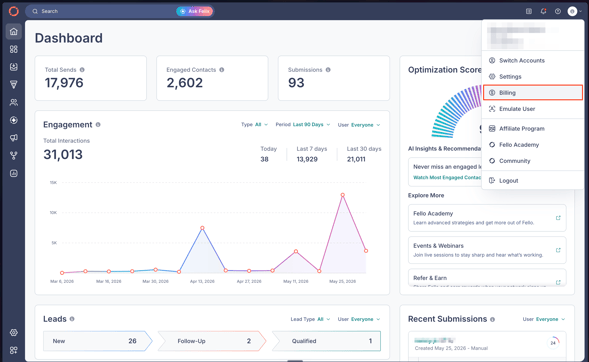
- Click your Profile from the top-right corner and select Billing.
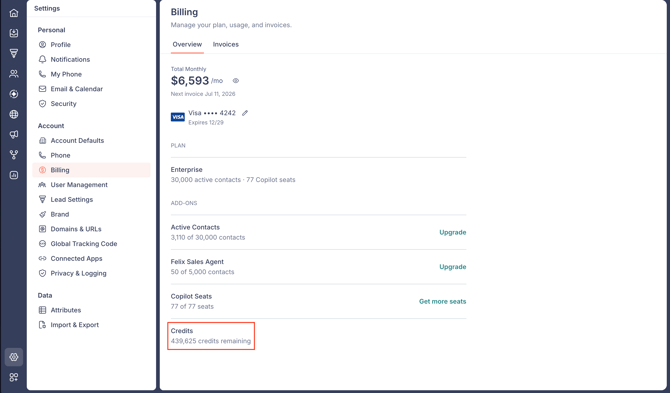
- Your remaining balance appears under Credits.
Changing your credits
To add or remove credits, contact Fello Support. The team will help you find the right amount for your account and process the change for you.
🗒️ Note: Credit changes, including adding and removing credits, are handled by Fello Support. Write to support@fello.ai to make a change.
Frequently Asked Questions (FAQs)
- What happens to purchased credits I don't use in a month?
- Unused credits roll over to the next month. You won't lose purchased credits if you don't use them all within a single month.
- Do credits expire?
- Purchased credits do not expire and stay available until you use them. Gifted or free credits do expire, with the expiration date set when the credits are issued. To find the expiration date on your account, reach out to your Customer Success Manager or write to us at support@fello.ai.
- How do I add or remove credits?
- Credit changes are handled by Fello Support. Write to support@fello.ai and the team will process the change for you.