
What is Ask Felix?
Ask Felix is the fastest way to get things done in Fello. Ask a question in plain language and Felix answers, including how-to questions about Fello drawn from Fello's knowledge base. Ask Felix can also take action on your behalf: searching your database, drafting a message, or running a multi-step task.
You can open it from the Ask Felix button at the top of every screen.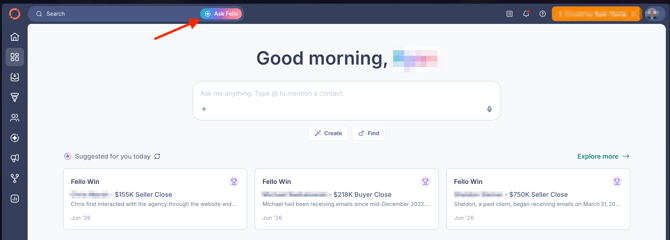
In this guide:
- What you can do with Ask Felix
- Open and use Ask Felix
- Chat history and full-page view
- How Ask Felix works
- FAQs
What you can do with Ask Felix
- Get answers about Fello: ask how a feature works and Felix answers from Fello's knowledge base.
- Search in plain language: find contacts, properties, and segments without building filters.
- Pull contact intelligence: ask about a specific contact's history and details.
- Get reports and summaries: ask for a rundown of recent activity or performance.
- Draft messages: have Felix write an email or text for you.
- Take quick actions: make changes across Fello with a single request.
- Navigate the platform: jump to any part of Fello just by asking.
Open and use Ask Felix
- Select Ask Felix at the top of any screen. It opens as a panel on the right side, over your current page.
- Type your request in the Ask me anything box. Type @ to mention a specific contact.

- Use the + to add files or photos, or the mic to speak your request.
- Not sure where to start? Select Create or Find for example prompts. Create helps you generate things like summaries and scripts. Find surfaces groups of contacts.
- Select the Open Sidebar icon in the panel header to see your past conversations without leaving the panel.
💡 Tip: To start a fresh conversation, select the new chat (pencil) icon in the panel header.
Chat history and full-page view
Ask Felix saves every conversation. Select the Open Sidebar icon in the panel header to open the sidebar, which gives you:
- New Chat: start a fresh conversation.
- Search: open All Chats to search your past conversations.
- Recents: jump back into a recent conversation.
Each past conversation shows its title and when its last message was sent. Your history stays available across sessions, so past conversations are still there the next time you log in. Select the same icon again to close the sidebar.
How Ask Felix works
- Available from the Ask Felix button on every screen.
- Understands your full database: contacts, properties, pipeline, and conversation history.
- Answers how-to questions about Fello from Fello's knowledge base.
- Asks you to confirm before making changes when needed.
- Gets better the more you use it.
- Included with every Fello plan at no additional cost.
Frequently asked questions
- Where do I find Ask Felix?
- At the top of every screen in Fello. Select Ask Felix to open it.
- Can I ask Ask Felix how to do something in Fello?
- Yes. Ask Felix answers how-to questions about Fello using Fello's knowledge base.
- Can Ask Felix make changes, or only answer questions?
- Both. Ask Felix can take action across Fello, and asks you to confirm before making changes when needed.
- Does Ask Felix cost extra?
- No. Ask Felix is included with every Fello plan at no additional cost.
- Does Ask Felix save my chat history?
- Yes. Select the Open Sidebar icon in the panel header to find New Chat, Search, and Recents. Your conversations stay available across sessions.